Address bar search suggestions don't autofill correctly after latest update
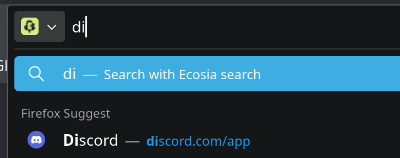
I noticed that after the latest update, searching with the address bar no longer works as smoothly: autocomplete suggestions only appear in the bar when typing in a single character on a new tab, rather than updating with each additional keystroke. The suggestion only appears upon unselecting and reselecting the address bar. (see uploaded images)
Also, the search suggests seem to regenerate the entire dropdown menu with each keystroke, resulting in an unpleasant "flickering" appearance. It's not the biggest deal, but I don't recall firefox (mis)behaving this way before.
Can anyone help me with this?
I noticed that after the latest update, searching with the address bar no longer works as smoothly: autocomplete suggestions only appear in the bar when typing in a single character on a new tab, rather than updating with each additional keystroke. The suggestion only appears upon unselecting and reselecting the address bar. (see uploaded images)
Also, the search suggests seem to regenerate the entire dropdown menu with each keystroke, resulting in an unpleasant "flickering" appearance. It's not the biggest deal, but I don't recall firefox (mis)behaving this way before.
Can anyone help me with this?