

اس تھریڈ کو آرکائیوکیا گیا تھا۔
اگر آپ کو مدد کی ضرورت ہو تو براہ مہربانی نیا سوال پوچھیں۔

آرکائیو شدہ
Can I disable the URL tooltip that pops up on the bottom of the screen?

Title says it all: I want to disable the url tooltip that appears when hovering over a link. How can I do this?
Title says it all: I want to disable the url tooltip that appears when hovering over a link. How can I do this?
تمام جوابات (3)
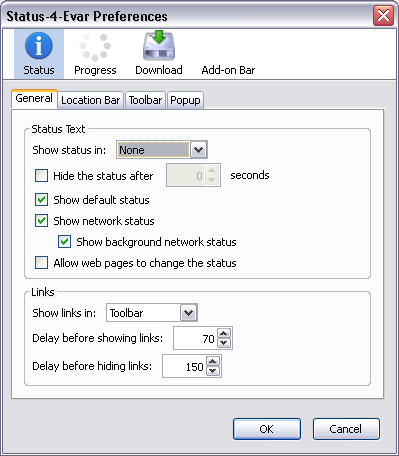
You can use this extension to hide that pop-up:
See the screenshot for Status-4-Evar Preferences. You will want to set Links to None, and probably set Status Text to None, too.
Excellent, thantks