


I just installed Firefox 5. How can I remove the Bing search from the address bar? I don't want to see Bing at all.

I just installed Firefox 5. How can I remove the Bing search from the address bar. I don't want to see Bing at all. I tired the Firefox options, right-clicking on the search field and the toolbar selection drop-down but could not find a way to get rid of that unwanted search window.
تمام جوابات (3)
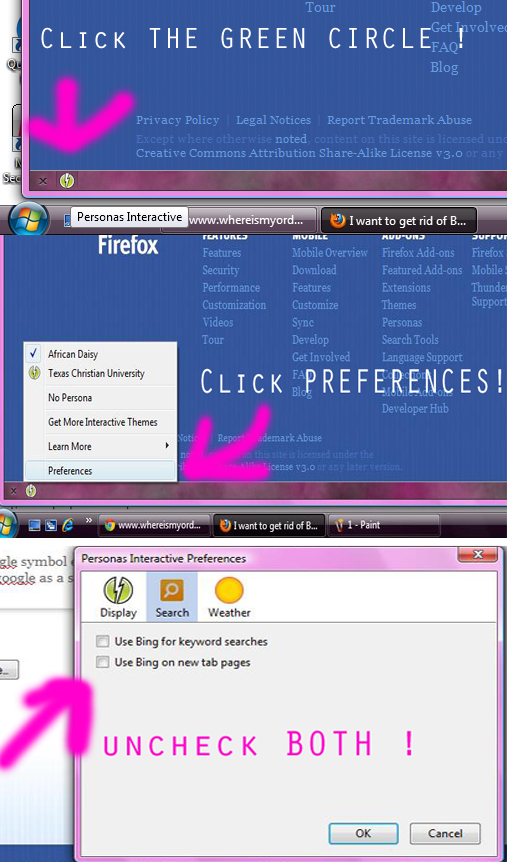
- at the bottom of firefox there is a weird looking greenish circle with a lightning bolt in it*
1. click it and hover over to PREFERENCES. 2. click the second circle that say's BING. 3. Un-check both boxes. 4. you're done :)
Note: it's not going to show the google symbol encrypt when you open a new tab it's just going to automatically use google as a search engine.
See this support posting about getting rid of Bing:
https://support.mozilla.com/en-US/questions/707519#answer-110461
the-edmeister کی جانب سے میں ترمیمکی گئ
This question has been locked because the original author has deleted their account. While you can no longer post new replies, the existing content remains available for reference.