


Avoid support scams. We will never ask you to call or text a phone number or share personal information. Please report suspicious activity using the “Report Abuse” option.

مزید سیکھیں
Open

Spell as you type not working

Graggs

So, I recently updated Thunderbird and I appear to have lost the Spell check as you type feature. By 'doesn't work' I mean; The incorrectly spelled word is underlined, but a right click shows; No Spelling Suggestion (which kind of suggested the feature can't find or isn't reading the dictionary)

I have done multiple things to try to get it to work.

I have checked I have the English Language Pack installed in Add-ons> Language I have check I have an English dictionary installed in Add-ons > Dictionary. (I have uninstalled the above and re-installed them too, including, shutting down Thunderbird in between)

I have unchecked the "Enable spell check as you type" in Settings > Composition, restarted Thunderbird and then re-checked it.

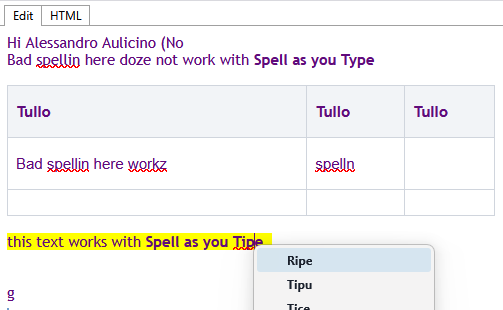
Quite by chance, while I was typing this, I added an Add-on called "Easy Table Editor by Cardella" And whilst testing it, I noticed the Spell Check as you Type worked in the Pop-up window and continued to work inside the inserted table in the compose window. NOTE: Text outside the table, still does NOT work.

Whilst playing around, I also used a Text Highlighter tool (TextMarker) and amazingly, text that has been highlighted, also seems to work with Spell Check as you Type.

I then deleted everything (Ctrl A) Delete. And any text I type, now responds correctly to the Spell Check as you Type.

So, something in the thml code seems to be disrupting the code?

I deleted this line and it works

I'm not convinced this is exactly what's causing it though? Anything I do within the ThunderHTMLedit window, then seems to allow Spell Check as you Type.

If I open a new message on an account without a template of any kind the Spell Check as you Type appears to work.

Next: I disabled ThunderHTMLedit rebooted Thunderbird and created a new message, but Spell Check as you Type still doesn't work, unless I disrupt the HTML by creating a table or highlighting the text.

I'm afraid I'm done now... hopefully someone will come up with a solution?
So, I recently updated Thunderbird and I appear to have lost the '''Spell check as you type''' feature. By 'doesn't work' I mean; The incorrectly spelled word is underlined, but a right click shows; No Spelling Suggestion (''which kind of suggested the feature can't find or isn't reading the dictionary'') I have done multiple things to try to get it to work. I have checked I have the English Language Pack installed in Add-ons> Language I have check I have an English dictionary installed in Add-ons > Dictionary. (I have uninstalled the above and re-installed them too, including, shutting down Thunderbird in between) I have unchecked the "Enable spell check as you type" in Settings > Composition, restarted Thunderbird and then re-checked it. Quite by chance, while I was typing this, I added an Add-on called "Easy Table Editor by Cardella" And whilst testing it, I noticed the Spell Check as you Type worked in the Pop-up window and continued to work inside the inserted table in the compose window. NOTE: Text outside the table, still does NOT work. Whilst playing around, I also used a Text Highlighter tool (TextMarker) and amazingly, text that has been highlighted, also seems to work with Spell Check as you Type. I then deleted everything (Ctrl A) Delete. And any text I type, now responds correctly to the Spell Check as you Type. So, something in the thml code seems to be disrupting the code? I deleted this line and it works <div class="smartTemplateHeader"> I'm not convinced this is exactly what's causing it though? Anything I do within the ThunderHTMLedit window, then seems to allow Spell Check as you Type. If I open a new message on an account without a template of any kind the Spell Check as you Type appears to work. Next: I disabled ThunderHTMLedit rebooted Thunderbird and created a new message, but Spell Check as you Type still doesn't work, unless I disrupt the HTML by creating a table or highlighting the text. I'm afraid I'm done now... hopefully someone will come up with a solution?
منسلک شدہ اسکرین شاٹٹس

You must log in to your account to reply to posts. Please start a new question, if you do not have an account yet.