


Solved
Why were the 'Strong Protection' and 'Maximum Protection' options removed from the DNS over HTTPS protection level settings? Are there any plans to bring them back?

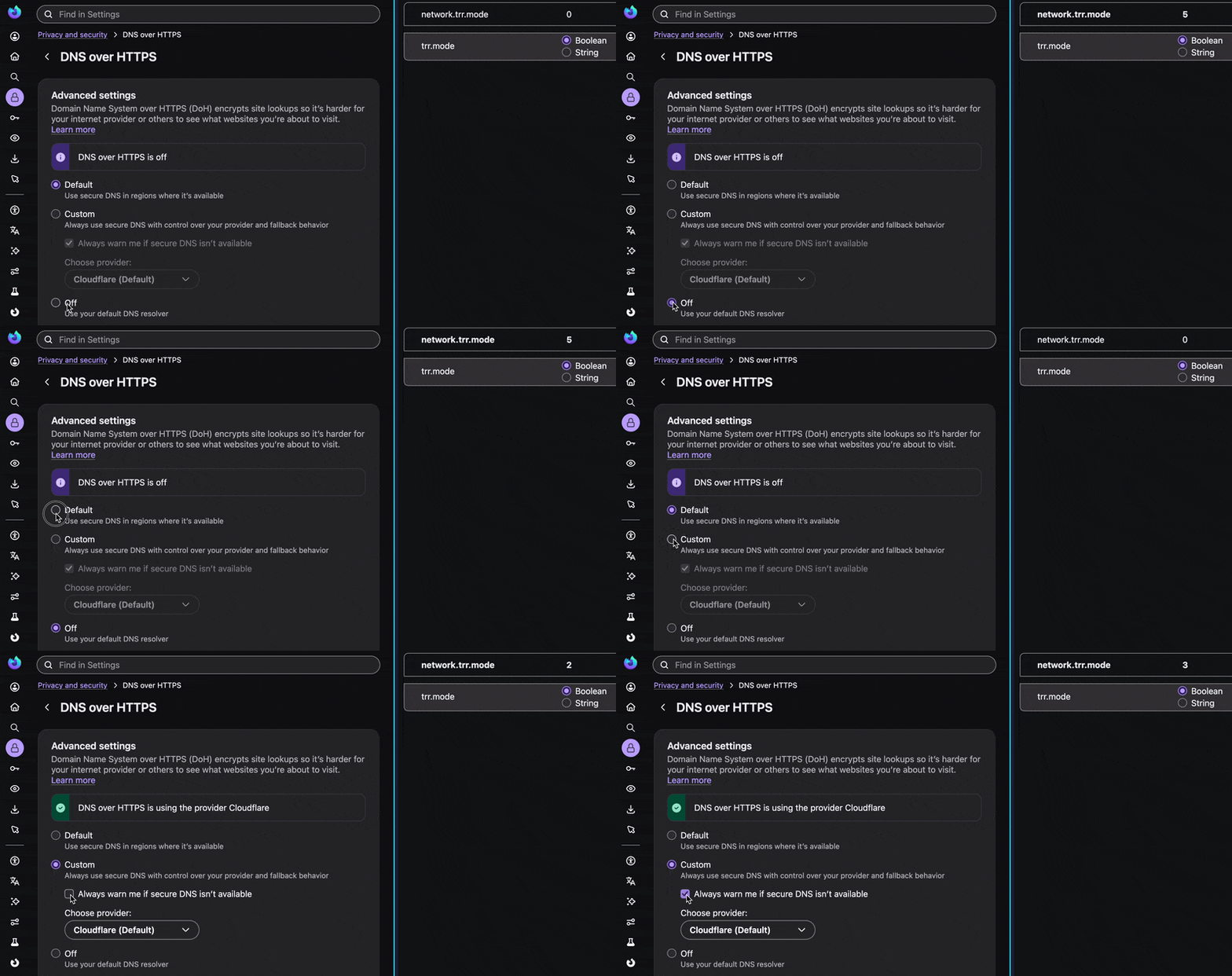
As the title suggests, here’s something that caught my attention in the new settings screen. Specify directly from about:config ↓ Change `network.trr.mode`
Value Behavior 0 Do not use DoH 2 TRR-first 3 TRR-only 5 User explicitly disables DoH
Does this provide the same effect as the “Strong Protection” and “Maximum Protection” options that were available in the previous settings screen? I would appreciate your response.
As the title suggests, here’s something that caught my attention in the new settings screen.
Specify directly from about:config
↓
Change `network.trr.mode`
Value Behavior
0 Do not use DoH
2 TRR-first
3 TRR-only
5 User explicitly disables DoH
Does this provide the same effect as the “Strong Protection” and “Maximum Protection” options that were available in the previous settings screen?
I would appreciate your response.
تمام جوابات (2)
منتخب شدہ حل
It's still the same. The "always warn" is now the "layperson" interpretation of the same:
Thank you for the clarification! That makes sense now. I appreciate your help.
jbr said
It's still the same. The "always warn" is now the "layperson" interpretation of the same: