Which file to bypass in Iolo System Mechanic to avoid loss of bookmarks

Just found that using Iolo System Mechanic to clean up my desktop is constantly causing the loss of my bookmarks and possibly my passwords. I have tried to specify which file(s) to ignore in System Mechanic to avoid this issue, but it is not allowing me to specify the files in my Appdata folders that I suspect it is clobbering. Has anyone been successful with this? I am getting tired of restoring my bookmark files every time I use the program. My wife's computer is having the same issue, and even worse in that she has also had her entire bookmark backup files wiped clean, which required her to re-enter all of her bookmarks manually. The folks at Iolo want me to pay for support before I can get any help from them.
تمام جوابات (2)
For the bookmarks and history this would be places.sqlite in the Firefox profile folder.
You can backup certain files with Firefox closed in the profile folderto have a backup of your personal data. Note that best is to avoid restoring a full profile folder and only restore important files that are safe to restore/transfer.
- bookmarks and history: places.sqlite
- favicons: favicons.sqlite
- bookmark backups: compressed .jsonlz4 JSON backups in the bookmarkbackups folder
- cookies.sqlite for the Cookies
- formhistory.sqlite for saved autocomplete Form Data
- logins.json (encrypted logins) and key4.db (encryption key/primary password) for logins saved in the Password Manager
- cert9.db for certificates stored in the Certificate Manager
- persdict.dat for words added to the spell checker dictionary
- permissions.sqlite for Permissions and possibly content-prefs.sqlite for other website specific data (Site Preferences)
- sessionstore.jsonlz4 for open tabs and pinned tabs (see also the sessionstore-backups folder)
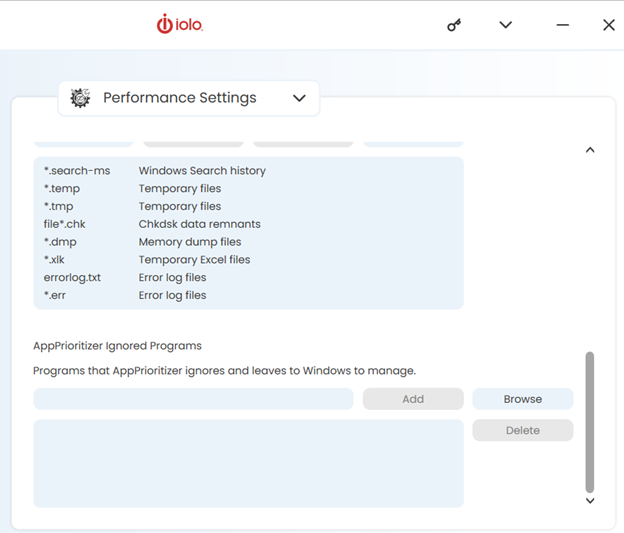
Thanks for your reply. I tried specifying a couple of these files in the iolo system mechanic Performance settings/AppPriotizer Ignored Programs feature and it would not accept any of them. Since it seems to be specifically asking for a "program" rather than a file or files. I tried entering
"C:\Program Files\Mozilla Firefox\firefox.exe" which it accepted, but it did not prevent the issue of bookmark/login loss.
I have attached a screenshot of the System Mechanic menu below.