


I can not play video from videomega.tv on mozilla, but when i use chrome, it works. How to fix this? Thanks..

I can not play video from videomega.tv on mozilla, but when i use chrome, it works. On mozilla it always can not be loaded, only says because server or network failed, or format can not supported. I have already upgraded flash player and use html5 extension, without result. How to fix this problem? Thanks..
منتخب شدہ حل
Thank you for your advice, but when i checked it on about:config, the value is 2 so i did not change anything.
When i search for another solution, accidentally i have installed unwanted search engine (socialmedia.com) so i am forced to reset mozilla. After that, both problem suddenly solved!
Thanks for all of your help and advice, it is greatly appreciated by me.
اس جواب کو سیاق و سباق میں پڑھیں 👍 1تمام جوابات (5)
I see a 404 error -- page not found -- from the server. This is inexplicable because the identical URL is found in Chrome on the same computer. Where is the problem?
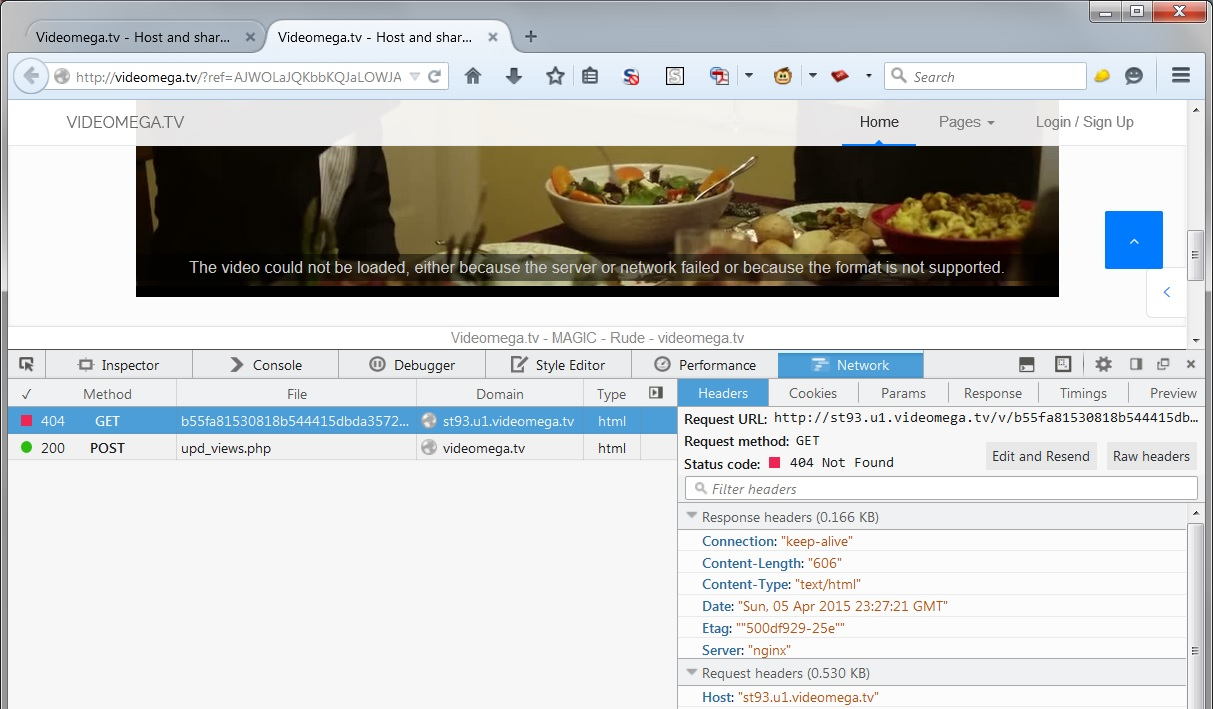
The problem is the missing referrer.
- http://videomega.tv/?ref=AJWOLaJQKbbKQJaLOWJA
- javascript:void(location.href=location.href);
cor-el کی جانب سے میں ترمیمکی گئ
Thanks for your info, helps me to understand the problem but it still exist. How it can be fixed, or its simply just a bug on mozilla? I hope i do not have to change my browser, too much bookmark to manage..
You need to go to "about:config" in the address bar, click the "I'll be careful" button, and then paste "network.http.sendRefererHeader" into the search box. Then, double click the item that appears and change its value to 2.
منتخب شدہ حل
Thank you for your advice, but when i checked it on about:config, the value is 2 so i did not change anything.
When i search for another solution, accidentally i have installed unwanted search engine (socialmedia.com) so i am forced to reset mozilla. After that, both problem suddenly solved!
Thanks for all of your help and advice, it is greatly appreciated by me.