Why are specific relay emails being sent to spam despite having a filter, and only being removed when the filter is run manualy?
I'm running the current 157.0.1 release on Windows 11, and specifically am having my emails from the AP be sent to spam even though I have a specific filter set to tag them. I feel as if the filter itself is set up properly because when I manually run it the messages will be moved from the spam folder to the inbox and tagged accordingly.
The one thing sticking out to me is these emails are being forwarded through my relay account. I've tried changing the filter to work based on the relay address, but again it only works when I manually run it. I've also tried setting the filter to run both before "and" after spam classification, but neither option works. Ideally the filter would work without me having to go to my spam and run it, and even then I'm wondering why the spam filter hasn't learned by now that those email belong in my inbox.
I'd appreciate any help or solutions; I'm not an email power user or networking wiz though so please try to keep it as dumbed down for me as possible!
Усі відповіді (10)
Hi Louie,
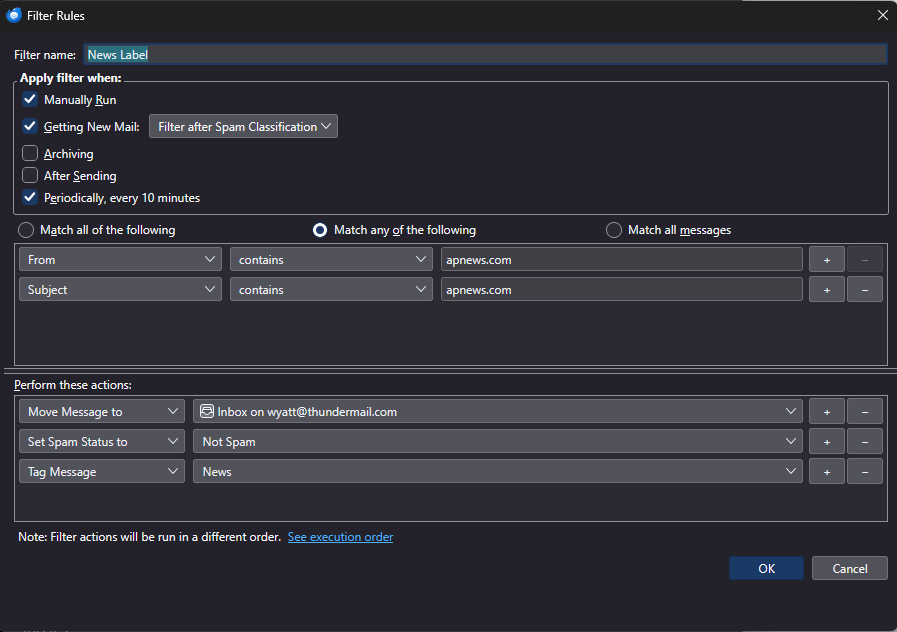
Thanks for the screenshot. Your filter is set to run when new mail arrives, but it is currently set to “Filter after Spam Classification.” That may explain the behaviour you're seeing: Thunderbird can classify the message as spam and move it to the Spam folder before your filter gets a chance to act on it. Automatic message filters are applied to new mail in the Inbox, not to messages that have already been moved to another folder.
I'd try changing the dropdown next to “Getting New Mail” to “Filter before Spam Classification.” Your existing “Set Spam Status to Not Spam” action should then also make sense, since the filter will catch the message before Thunderbird's spam classification.
Your filter rules themselves look reasonable, although I would probably remove the Subject condition if the AP messages don't actually have “apnews.com” in their subject. The From condition should be enough if that domain is reliably present in the sender address.
If it still happens after changing it to “before Spam Classification,” the Filter Log would be the next thing I'd check to see whether Thunderbird is actually running the filter when the message arrives.
Hi Max,
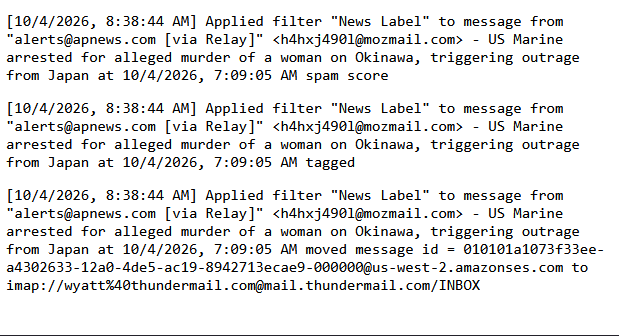
Thanks for the response! I tried the changes you suggested, but am still having the same issue with my news emails. When I checked my spam folder the most recent news email was still there unsuccessfully filtered. I ran the filter manually after clearing the filter log, and attached the results here.
The news label is the biggest example I have, but in general I've noticed that emails from any of my relay addresses, even when set in the relay to forward all messages, will almost always end up directly in my spam folder whether there are filter rules in place for them or not. I've been curious if it's a situation of Thunderbird needing to be running for the filters to apply, but whenever I boot up and log on in the mornings I still have to manually run my filters to get messages out of the spam and tagged correctly in my main inbox.

Змінено Louie
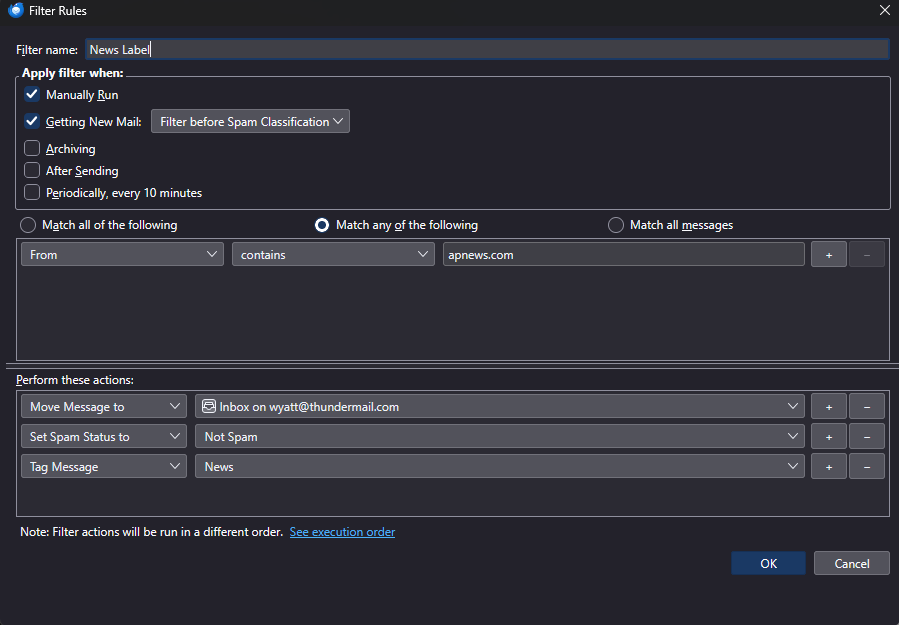
Over the weekend I still had all of my incoming news which was forwarded through my relay mail address sent directly to the spam folder which I've attached an image of. Even with the updated message filter provided by Max I still have to manually run my news filter to get the relevant emails out of the spam folder, properly tagged, and moved into my main inbox.
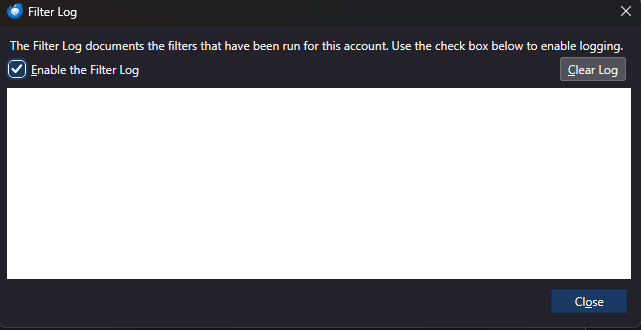
I checked the filter log after seeing so many news emails in my spam, and it was completely blank. At this point I feel like it's an issue of the filters either not automatically running, or some weird interaction between the filters and mail forwarded from the relay, but then again this is just an amateur hunch.
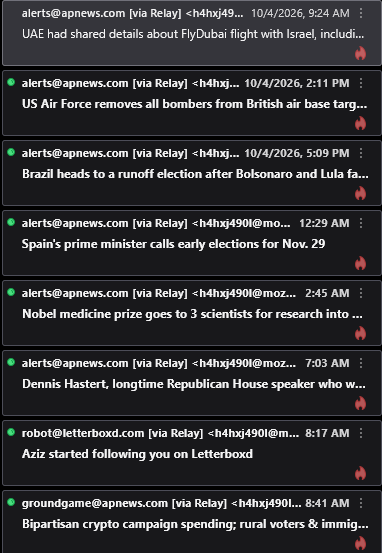

Over the weekend I still had all of my incoming news which was forwarded through my relay mail address sent directly to the spam folder
To avoid false positives you need to train the adaptive spam filter by marking them as 'Not Spam'. https://support.mozilla.org/kb/thunderbird-and-junk-spam-messages
Ever since this problem has started I've marked at least 50 news emails as not spam, and thats AFTER resetting the training data because I heard that may be a potential solution. Also while my news filter is the most frequent example, I still have other emails forwarded through my other relay addresses that also default to my spam folder. All in all is this really the only way to get Thunderbird to properly apply it's filters and tags? It seems like so much commitment and extra effort on my part I almost dont want to believe it, especially since after 50+ emails of one category alone there doesn't seem to be any signs of improvement. I hate to think about all my other labels and filters I'll also have to babysit if this is the case.
Is there any reason why the spam filter is so aggressive to this degree? Is it by design? I have the AP news address even saved to my address book and they're still defaulting to spam, that cant be everything working as intended can it? If anything I'd expect Thunderbird by design to play nice with my relay emails, is the spam filter really meant to indiscriminately spam anything coming from them, and if so why is there an option in relay to have them forwarded in the first place? If clocking in every few hours to correct my spam folder is the only way forward, then I guess I'll do it until I become too annoyed to continue, but I'm hoping there's another way.
Another update:
I tested another email inbox today with the same news filters applied for the same AP emails. This was a Gmail account, and it had no issues. I really do think this is a matter of either Thunderbird not running filters on emails received from relay addresses, or Thunderbird filters just blatantly not running before OR after spam classification. This is the only explanation I can think of due to my spam folder being full of news emails, and the filter log being completely empty as if no emails were received whatsoever.
I've continued marking things in my spam folder as "Not spam", and am in the 60s by my current count with my AP emails still showing no signs of improvement. I do not think this is a matter of the spam filter not being trained, but if it is, does anyone have a success story or two with this process eventually working?
Would anyone be able to confirm if the filter log should be blank when emails meeting the criteria end up in my spam folder? I had 6 AP emails in my spam folder this morning with no entries in the filter log for them. If my label filter is set to "apply before spam classification" like Max suggested wouldn't that mean that if it were working properly the filter rules would apply to the message before Thunderbird decides that it's spam? I'm asking because if the filter log being blank means that it's not running when it should, then I don't think I understand how manually marking the emails as "not spam" (I'm still doing this) will change anything.
If the filter rules are being run successfully after enough emails are marked, and no longer defaulting to the spam folder with a blank filter log, then I think that points at the problem being somewhere between incoming mail and spam/filter application. I know I'm a novice, but I really think something is broken/wrong here, and I'm hoping to get more input, dialogue, help, troubleshooting, and whatever else to either help me understand more clearly, or come up with a solution. I'm willing to cooperate however necessary, and I want to help, but other than sharing my problem, troubleshooting experience, and potential ideas, I don't know how else to do this.
I've leaned in hard to the training the spam filter "solution", and have put all my news email subscriptions in full swing. My spam folder gets a hit on average every hour, and I'm regularly "training" it (if you can call it that). I have crossed into the triple digits (103 specifically) of marking my AP news emails manually as "not spam", and it shows no signs of improving anything. 100+ manual spam trainings and not so much as a single email sent to the inbox instead of the spam folder. I'm hanging in there, I'm trying to be communicative and helpful, and I'm staying consistent with any updates or new observances. Is any of this enough for someone to step in and help me? I've responded to the two replies as promptly as I was able to, and included direct information related to both of their solutions. I promise if anyone wants to help or support me I promise I'm committed to helping solve this; I unfortunately just need some help from the community or development team...

re :I ran the filter manually after clearing the filter log, and attached the results here.
That proves the filter operates all three actions when run manually on the Spam folder.
If Filter Log has no entries then filter did not do anything.
Thinking out aloud here: )
I believe Firefox 'Relay' does not filter for spam. But is it possible the Spam setting was already set before it Relayed via mozmail ?
Filter only auto operates on emails received into Inbox. Is it possible they never went to Inbox in first place so your filter did not operate as there was nothing to filter in Inbox?!
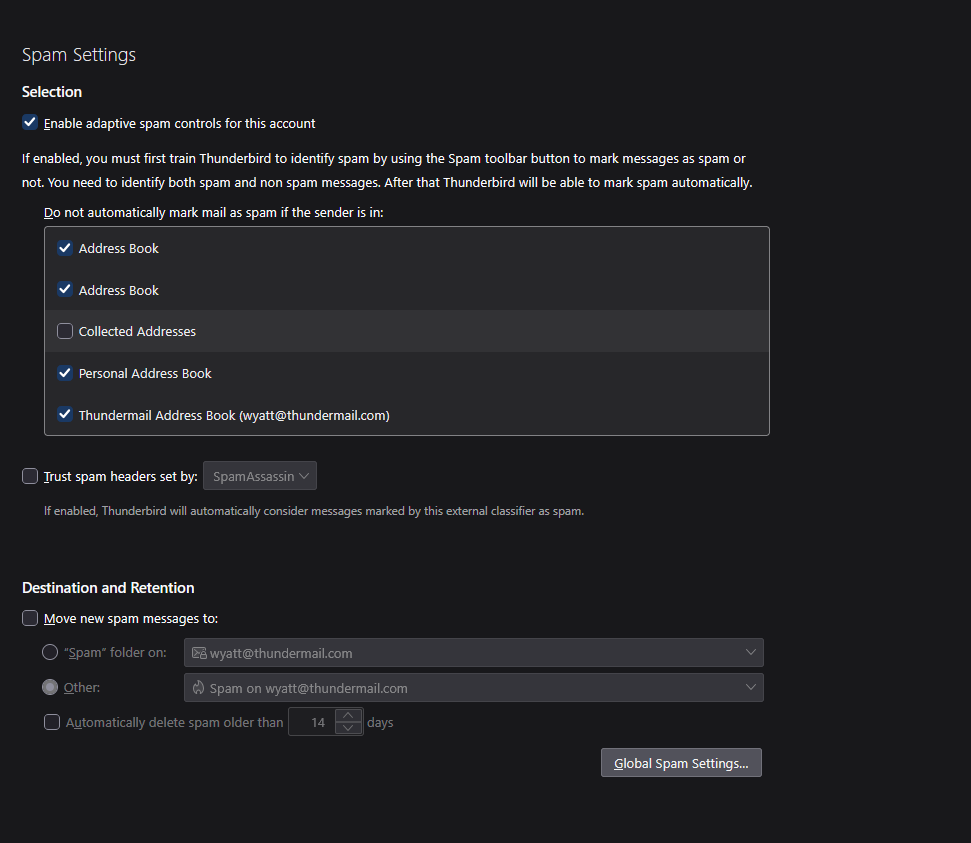
In 'Account Settings', 'Spam settings' - for the 'mozmail' account. What have you set up on account that receives those emails? Post an image.
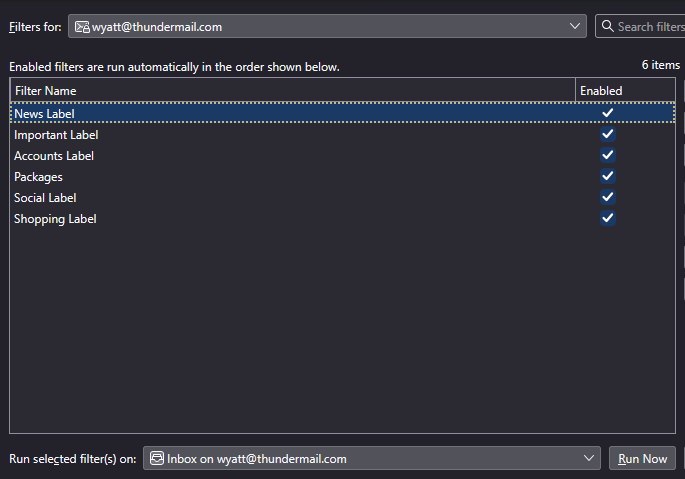
Another question: Do you have another Message Filter that is higher up in the list - above 'News Label' ? Post image showing the list of Filters.
If yes: Please move the 'News Label' filter to the top of the Filter list because filters run in the order listed. Please report back on whether it worked better after moving to top of the filter list.
Do you have any filter that has an action to send an email to the Spam folder ? If yes, post an image of the filter.
Hi Toad!
Very big thanks for your response, I think this is well on it's way to being potentially solved all thanks to you! I looked at my account settings for my mozmail account, and the issue of the emails never making it to the inbox in the first place seems very likely.
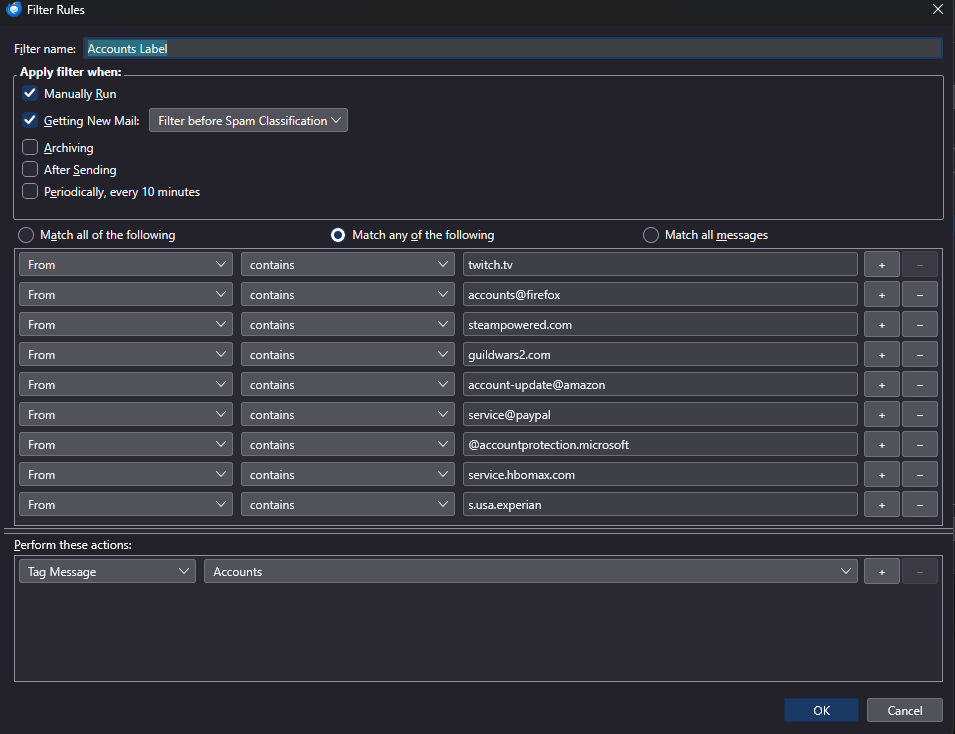
My news filter was moved to the top of the list when this issue first kicked up, but my "Accounts" filter and associated labels have also been consistently sent to spam. I'm confident in the settings because when run on the spam folder, they too work properly which is another sign that the emails just aren't being delivered in a way that allows the filters to work. I noticed in the "Destination and Retention" section that the "Move new spam messages to" field was unchecked (as shown in the attachment). I checked it, but am unsure which of the two options select.
For filters to apply would the "Other" button be the best option, and then selecting for spam messages to go to my mozmail inbox? If that option is selected I definitely think all of my filters will start applying because everything will be in my inbox, and I'm assuming the built in spam list (SpamAssassin in this case) will automatically catch anything else and move it to the spam folder accordingly no? Thank you again for the helpful response, you just dont know how close I was to throwing up my hands and just walking away from all of this!