Cannot save photos sent from iPhone as jpg on our hard drive. Have done this for ten years until yesterday.

As a twelve or more years user of Thunderbird, I find it to be okay most of the time. I hate the spam folder that does not learn and I hate threads.
Today all of a sudden, I cannot save photos sent from my iPhone as jpg. I have always right clicked and a menu has appeared. Today, the right click just zooms in which I never want to do when I am trying to save.
I tried searchig online first before coming here. Apple is claiming that Thunderbird developers made a mistake and that is why the right click is not working. AI had me try a bunch of different techniques none of which worked.
When I do save after much effort, the "photo" in my Animals folder appears as the Thunderbird logo instead of the real item itself. The other weird thing is that my folders also do NOT show up where they should when I am trying to save. The menu doesn't give me all the folders as it always has. Instead it just say All Files which is not adequate.
Вибране рішення
The right click to get the save as menu is fixed. I had given up and was usig Gmail. I finally tried Outlook in Thunderbird once and it worked! Thanks for all help. Version 158 is better.
I don't thinkthe spam issue is repaired though. Shift-J DOES NOT WORK. The program learns NOTHING.
No clue if Thunderbird engineers ever intend to allow me to change my passwordain Thunderbid. I hate having to create an accout at a separate site just to change my password. That is lame, cheap and shoddy.
Усі відповіді (15)
Are you sure the Iphone is sending JPEG files? Seriously! I keep getting things apple calls Something.jpg.heic As HEIC is an Apple proprietary format I have to locate an addon for windows to interpret it.
Matt, That was an interesting question. I went to my outgoing email from iCloud and the photos are ALL in jpeg.
Even if the photos had had the extension you mentioned, that would not explain why right clicking my mouse no long produces a menu, but instead just zooms in and out.
Mozilla/Thunderbird has definitely changed things to make saving photos in a specific folder not possible. Also, I now know, thanks to your question, that the photos are leaving my phone as jpeg.
Thank you for your help in clarifying this.
Earlier today I could see this in the Daily build. Tonight it updated and now the menu is back. So I will guess it was an unintended change that has been reversed and will appear in the next release (I don't use 156 I use ESR because it is more stable so initially could not replicate.)
I haven't marked this as solved as it isn't solved yet on my end. You have given me hope. That is worth something. Thank you!
EastTenn said
Today all of a sudden, I cannot save photos sent from my iPhone as jpg. I have always right clicked and a menu has appeared. Today, the right click just zooms in which I never want to do when I am trying to save.
I cannot reproduce your issue, at least not in my macOS version of Thunderbird 156. That is, I do not know where exactly WHERE you do the R-click on a photo.
I just sent a photo in the jpeg format from my iPhone to one of my email addresses in Thunderbird on my iMac. After receiving the message in Thunderbird I right-click on the attached jpeg file or anywhere on the photo and can see the usual context menus (see images)
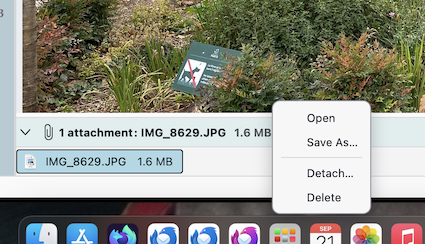
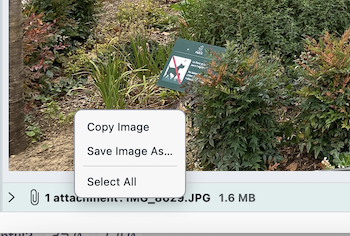
To: Mapenzi I am using Windows 11 on a PC less than a year old. I just this minute tried the right click. It still jsut zooms in and out. As you said, right click anywhere o the photo should work. For me, it does not wok. A different poster said he thought change was coming. I surely do hope so.
This is for Matt and Mapzeni,
I now know FOR CERTAIN that something has changed for the worse in Thunderbird. I know this because I just sent three photos from my phone's iCloud to my Gmail. I downloaded one of the photos and then right clicked as I used to do in Thunderbird and VOILA the menu appeared! I was able to edit and then send the one photo to my Animals 2026 folder. I began sending to Thunderbird instead of Gmail as Thunderbird displayed the pictures better. However, I now am not so desperate as I have a workaround.
I still would prefer that the folks at Thunderbird fix this. I also wish they would delete the horrid Spam folder that DOES NOT LEARN when I do the Shift-J. I followed the advice from here and made myself an Outlook account and somehow was able to white list some stuff. My husband also gets things in Spam that shouldn't go there. I have not created an Outlook account for him. I just check his spam every week and move things for him. This is WORK that I never had to do before the horrible Spam folder was introduced. The Spam folder has NO BENEFIT at all. It just makes work for me.

I have the same issue in 156 on Windows. Makes it very difficult to get work done when you can't save a basic image. This happened in the past as well. Hoping it is fixed quickly.
I am on automatic update for Thunderbird. Today, I was initially happy when I saw an update to 156.0.1. That did not last. The problem is still there. I am grateful to read that I am not alone in this. I surely wish Thunderbird would fix it.

Hello, I am having exactly the same problem with Thunderbird 156.0.1 on Windows 11. Images embedded in emails can only be zoomed in on, whether I right-click or left-click. It is no longer possible to access the context menu that used to allow saving the image... Is there a way to temporarily modify a hidden Thunderbird setting while waiting for the bug to be fixed? Philippe
Philippe has filed the following bug report https://bugzilla.mozilla.org/show_bug.cgi?id=2076215
Tonight at 7:49 on September 29, the bug is not yet repaired. I am grateful for Philippe filing a bug report.
Tonight, I saw that Thunderbird is now on version 157.0.1. Of course, I immediately sent a photo from my phone and right clicked. It STILL just zooms in and out. I see there are THREE of us with this same problem. If it is a known mistake why on earth can't they just fix it?
A note to the engineers: I am OLD and could possibly donate occasionally. I did donate once, but then the horrible spam problem was introduced. I haven't donated since then.
My three priorities: 1. Allow me to change my password IN THUNDERBIRD not at some remote site. 2. Fix the spam issue so that Shift J actually forces the program to learn. It does nothing at present. 3. Fix the photo problem so I can once again as I used to do save photos to my hard drive.
Вибране рішення
The right click to get the save as menu is fixed. I had given up and was usig Gmail. I finally tried Outlook in Thunderbird once and it worked! Thanks for all help. Version 158 is better.
I don't thinkthe spam issue is repaired though. Shift-J DOES NOT WORK. The program learns NOTHING.
No clue if Thunderbird engineers ever intend to allow me to change my passwordain Thunderbid. I hate having to create an accout at a separate site just to change my password. That is lame, cheap and shoddy.
EastTenn said
The right click to get the save as menu is fixed. I had given up and was usig Gmail. I finally tried Outlook in Thunderbird once and it worked! Thanks for all help. Version 158 is better. I don't thinkthe spam issue is repaired though. Shift-J DOES NOT WORK. The program learns NOTHING. No clue if Thunderbird engineers ever intend to allow me to change my passwordain Thunderbid. I hate having to create an accout at a separate site just to change my password. That is lame, cheap and shoddy.
Sadly I have no idea what you are talking about really.. I said the menu item would be fixed and it was. But this other stuff comes from left field and does not really sound in the least correct.
Passwords are edited/stored in the password manager. See https://support.mozilla.org/en-US/kb/password-manager-remember-delete-change-tb#search
This process has been essentially unchanged for the 20 years I have used Thunderbird. here is a blog post I wrote in 2011 on the subject, you will notice the details have changed little in the official support document. One thing that is never going to happen is Thunderbird allowing you to change your password in the application, because all Thunderbird does and can do is offer your mail provider password as and when required. It has no control over the mail provider or how they set or require them to be changed.
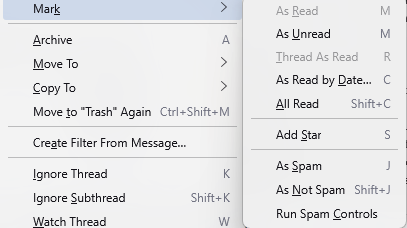
Now what exactly do you expect to happen when you press Shift +J? Shift+J marks an individual message as not spam. The only visual you would ever see is the SPAM flag disappears from the list entry and if the message was placed in SPAM by the mail provider it has no flag to remove so in those cases nothing happens. If your settings are default it should also move the message to or from the SPAM folder, but I have seen that fail because of external issues with antivirus products.
We also have a huge issue these days with folk expecting Thunderbird to fix spam issues created by their chosen mail provider. (Hence my comment earlier about the flag not being set, it is the only clue.) Thunderbird has no control over what your provider considers SPAM. I have no idea what mail provide you use or the SPAM tools they deploy. Thunderbird knows were to get your mail, your password and that is about all. So if you provider (Yahoo is perhaps one of the worst for false positives and basically no opt out process. They just keep putting mail back in spam after you move it out.) has an aggressive SPAM policy and a load of false positives you need to address that level of SPAM filtering, not the ones in Thunderbird.
My three priorities: 1. Allow me to change my password IN THUNDERBIRD not at some remote site.
Probably simple not possible at all, ever in any mail client, not only just in Thunderbird.
2. Fix the spam issue so that Shift J actually forces the program to learn. It does nothing at present.
Learn what? To do what?. I have fielded hundreds of folks questions over the years about spam and junk mail controls and to be honest most complaints have nothing to do with the software, only the knowledge of the person making the complaint and their expectations that software would finx something that required involvement of law makers.
3. Fix the photo problem so I can once again as I used to do save photos to my hard drive.
Done