


Windows 10 reached EOS (end of support) on October 14, 2025. If you are on Windows 10, see this article.

Шукати в статтях підтримки

Остерігайтеся нападів зловмисників. Mozilla ніколи не просить вас зателефонувати, надіслати номер телефону у повідомленні або поділитися з кимось особистими даними. Будь ласка, повідомте про підозрілі дії за допомогою меню “Повідомити про зловживання”

Докладніше
Відкрито

Calendar problem with week view

Michel T відповів
ThunderbirdUser23987

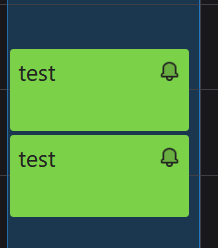
This will make more sense if you look at the attached images first. If I create two one-hour appointments back to back on the same day--meaning the first appointment ends at the same time the next one begins (or with a 1 min gap), and then I look at my calendar in Week view, I'll see 2 full-column 1-hour blocks stacked one above the other as in the "1hr appt.png" attached. This appears to be the correct way it should appear.

But if the earlier appointment is only 30 minutes, they appear differently, as in the other image "30min appt.png". squeezed into two columns. I would like them to appear as a single, full column (as with the 1 hour appointments), which it does in the Day view.

Is this a bug? Can I change this behavior?
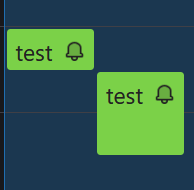
This will make more sense if you look at the attached images first. If I create two one-hour appointments back to back on the same day--meaning the first appointment ends at the same time the next one begins (or with a 1 min gap), and then I look at my calendar in Week view, I'll see 2 full-column 1-hour blocks stacked one above the other as in the "1hr appt.png" attached. This appears to be the correct way it should appear. But if the earlier appointment is only 30 minutes, they appear differently, as in the other image "30min appt.png". squeezed into two columns. I would like them to appear as a single, full column (as with the 1 hour appointments), which it does in the Day view. Is this a bug? Can I change this behavior?
Вкладені знімки екрана

Усі відповіді (1)

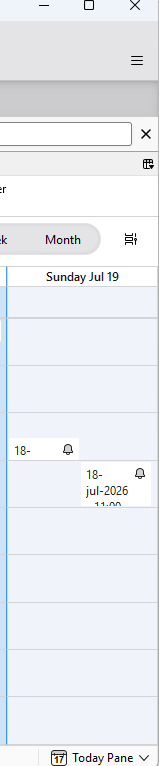
Is it possible that your thunderbird is not in "full screen" or its height is not big enought and Thunderbird could not show it as 2 blocks one after another.

I just attached 2 screen shots : they both contain the same day with 2 appt , first one is 30 minutes and the second is 1 hour, one after the other. The first screen shot is when Thunderbird height is short and the second is when Thunderbird height is longer

Змінено Michel T

Запитати

Щоб відповідати на повідомлення, ви повинні ввійти у свій обліковий запис. Поставте нове питання, якщо ви ще не маєте облікового запису.