TBird is automatically deleting messages

Each time I open TBird, I get a message at the bottom left of the screen telling me that TBird has deleted X number of messages. I do not want TBird to ever delete any messages. How do I turn this automatic delete function off?
Усі відповіді (5)
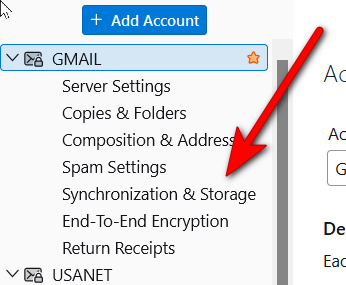
You didn't share much. If IMAP, look at synchronization&storage pane and check retention policy. If POP check the disk space pane. I think one of those may be the issue
I do not know what or where these items are nor do I know how to get to them. Please provide more details: - IMAP - synchronization & storage pane - retention policy - POP - disk space pane
Thank you.
First, since state being unaware of these terms, I suggest reading this URL to understand those terms of IMAP and POP. https://support.mozilla.org/en-US/kb/difference-between-imap-and-pop3
- click the hamburger menu in upper right (three short stacked lines)
- select 'account settings'
- your account appears in left sidebar
- click the 'server settings' pane of the account, The top line will display IMAP or POP
- if the ccount is IMAP, there will be a 'synchronization&storage' link - that shows settings for deleting
- if the account is POP there will a 'disk space' link with settings for deleting
Thank you.
The account is IMAP. There is no " "'synchronization&storage' link" on the settings screen.
see attached screenshpt