


I am trying to enter new settings and can't locate the page

I used to have Thunderbird on this laptop and was using Microsoft Office 365. I have since stopped using it from GoDaddy. I uninstalled the old Thunderbird and reinstalled a new version. I am trying to enter the new server settings but I keep getting the old Office 365 settings showing up. How do I get rid of that and find the new settings page to enter the new settings?
All my old email accounts are showing up and I only want to add 2 to the new Thunderbird. I thought uninstalling would delete all the old stuff. Please help.
Усі відповіді (2)

I'm not sure I understood what you want.
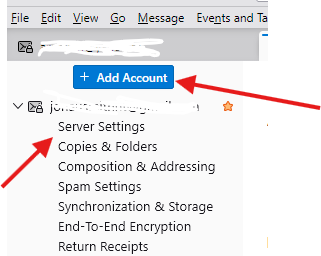
If you want to add 2 new email accounts then : - Right click on any email account - And click on Settngs - Look at the top of the Settings, you should see a blue button "Add Account"
If you want to change the server settings of an existing account then - Right click on that email account and click on Settings - Click on Server Settings
I keep getting "The certificate is not valid.....etc..."
I made a contribution to THunderbird to start using it again and I can't get past that message that keeps popping up. The 2 accounts I want to add were on the old Thunderbird so all those old emails from 2023 are showing up. I'll continue to try to add a new account but I already attempted what you suggested and got nowhere. Like I said I thought uninstalling and reinstalling would solve the problem but it hasn't.