


Windows 10 reached EOS (end of support) on October 14, 2025. If you are on Windows 10, see this article.

Шукати в статтях підтримки

Остерігайтеся нападів зловмисників. Mozilla ніколи не просить вас зателефонувати, надіслати номер телефону у повідомленні або поділитися з кимось особистими даними. Будь ласка, повідомте про підозрілі дії за допомогою меню “Повідомити про зловживання”

Докладніше
Відкрито

Tb saves msg to wrong folder.

david відповів
mike-a

Whenever i send a message , it is saved to the 'inbox' previously it would be saved "sent mail". I have verified that TB is configured to save to sent mail but the msg is saved anyway to inbox.

Can some one explain how to get back to saving sent messages to sent mail folder.

In all honesty I find it frustrating to keep moving msgs manually.

Whenever i send a message , it is saved to the 'inbox' previously it would be saved "sent mail". I have verified that TB is configured to save to sent mail but the msg is saved anyway to inbox. Can some one explain how to get back to saving sent messages to sent mail folder. In all honesty I find it frustrating to keep moving msgs manually.

Усі відповіді (7)

A Google search provides this answer...

(https://www.google.com/search?q=change+where+thunderbird+saves+sent+messages&rlz=1C2VDKB_enGB1120GB1120&num=10&newwindow=1&sca_esv=f1fb8f2ab13df819&sxsrf=ANbL-n4dDWRVyIk875ujzquXiuBkP5UCaA%3A1779651138271&source=hp&ei=QlITaraNDZuvhbIP1e3FmAc&iflsig=AFdpzrgAAAAAahNgUkVxCkfIyq9ze8R0gKH5MAo1vSlQ&ved=0ahUKEwi2tquP1dKUAxWbV0EAHdV2EXMQ4dUDCCU&uact=5&oq=change+where+thunderbird+saves+sent+messages&gs_lp=Egdnd3Mtd2l6IixjaGFuZ2Ugd2hlcmUgdGh1bmRlcmJpcmQgc2F2ZXMgc2VudCBtZXNzYWdlczIFECEYoAEyBRAhGKABMgUQIRifBTIFECEYnwUyBRAhGJ8FMgUQIRifBTIFECEYnwUyBRAhGJ8FMgUQIRifBTIFECEYnwVI239Qig1Y9XtwAXgAkAEAmAF3oAGFHKoBBDQwLjS4AQPIAQD4AQGYAi2gAugdqAIKwgIHECMY6gIYJ8ICDRAjGJ4GGPAFGOoCGCfCAg0QLhjHARivARjqAhgnwgIQEC4YgAQYigUYxwEYrwEYJ8ICBBAjGCfCAhAQIxjJAhjwBRiABBiKBRgnwgILEAAYgAQYigUYkQLCAg0QABiABBiKBRhDGLEDwgIKEAAYgAQYigUYQ8ICExAuGIAEGIoFGEMYsQMYxwEY0QPCAgsQLhiDARixAxiABMICChAjGIAEGIoFGCfCAggQLhiABBixA8ICCxAAGIAEGIoFGLEDwgIOEAAYgAQYigUYsQMYgwHCAggQABiABBixA8ICDhAuGIAEGLEDGMcBGNEDwgILEAAYgAQYsQMYgwHCAgUQABiABMICChAAGIAEGBQYhwLCAg4QLhivARjHARjJAxiABMICBhAAGBYYHsICCxAAGIAEGIoFGIYDwgIFEAAY7wXCAggQABiABBiiBMICCBAAGIkFGKIEwgIHECEYChigAZgDD_EFQgPzLKv99aGSBwQ0MS40oAe5qwKyBwQ0MC40uAfZHcIHCTEuMjMuMTguM8gHmwGACAE&sclient=gws-wiz)

Follow these quick steps:

Click the menu icon (three horizontal lines) in the top-right corner of Thunderbird and select Account Settings.

In the left-hand panel, click on Copies & Folders directly under the specific email account you want to change.

On the right side, find the When sending messages, automatically: section.

Locate Place a copy in and choose your preferred destination:

Your settings should look like this (mine)... See attached pic 😉

Hope that helps. 😊
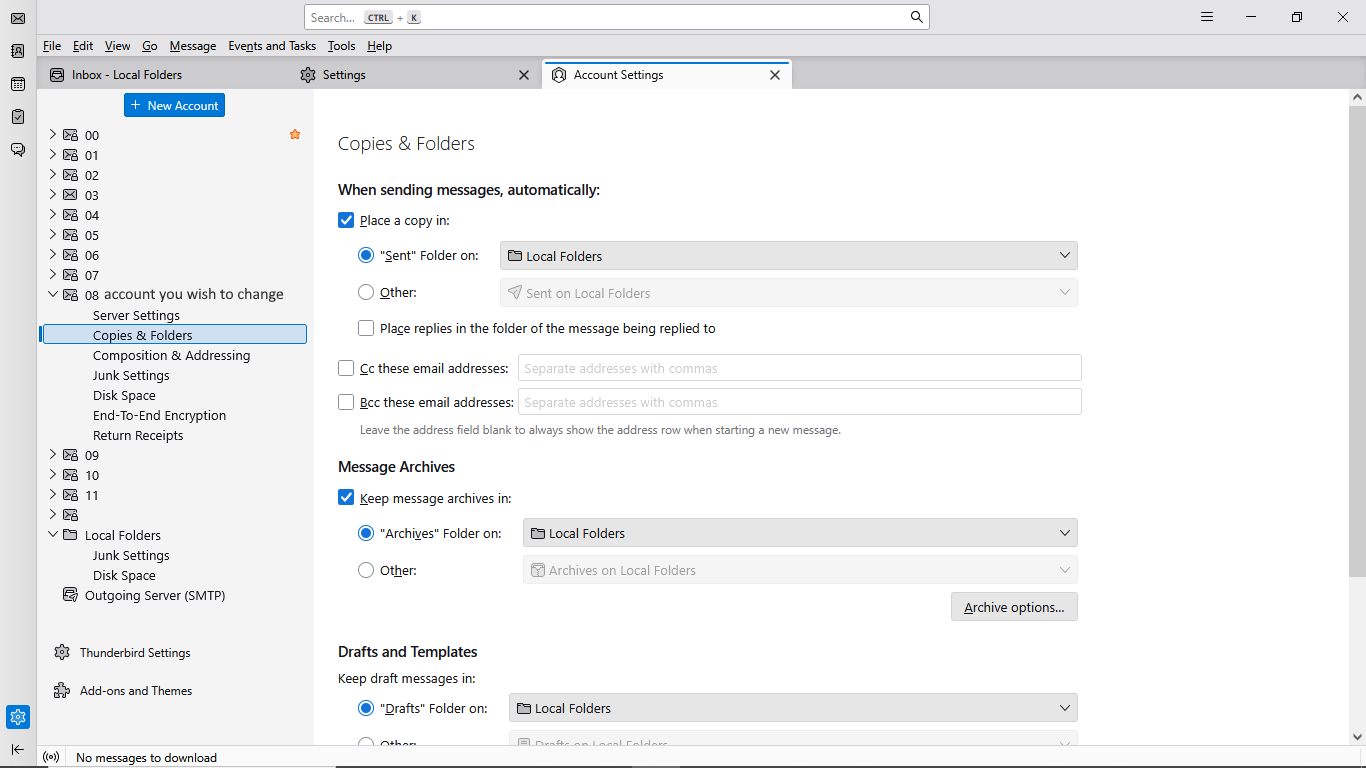
Did this fix your problem, Mike?

I admit that my eyes played some tricks on me - the check box for copies and folders was set to other instead of sent not sure how that happened but...

Unfortunately, i just sent a msg and it was placed in my 'inbox'. I have tried to search thru about:config but didn't see anything that looks like it would help.

Any suggestions etc would be appreciated. Mike

please do a screenshot of you copies&folders pane for that account

Here is screenshot as requested - Mike
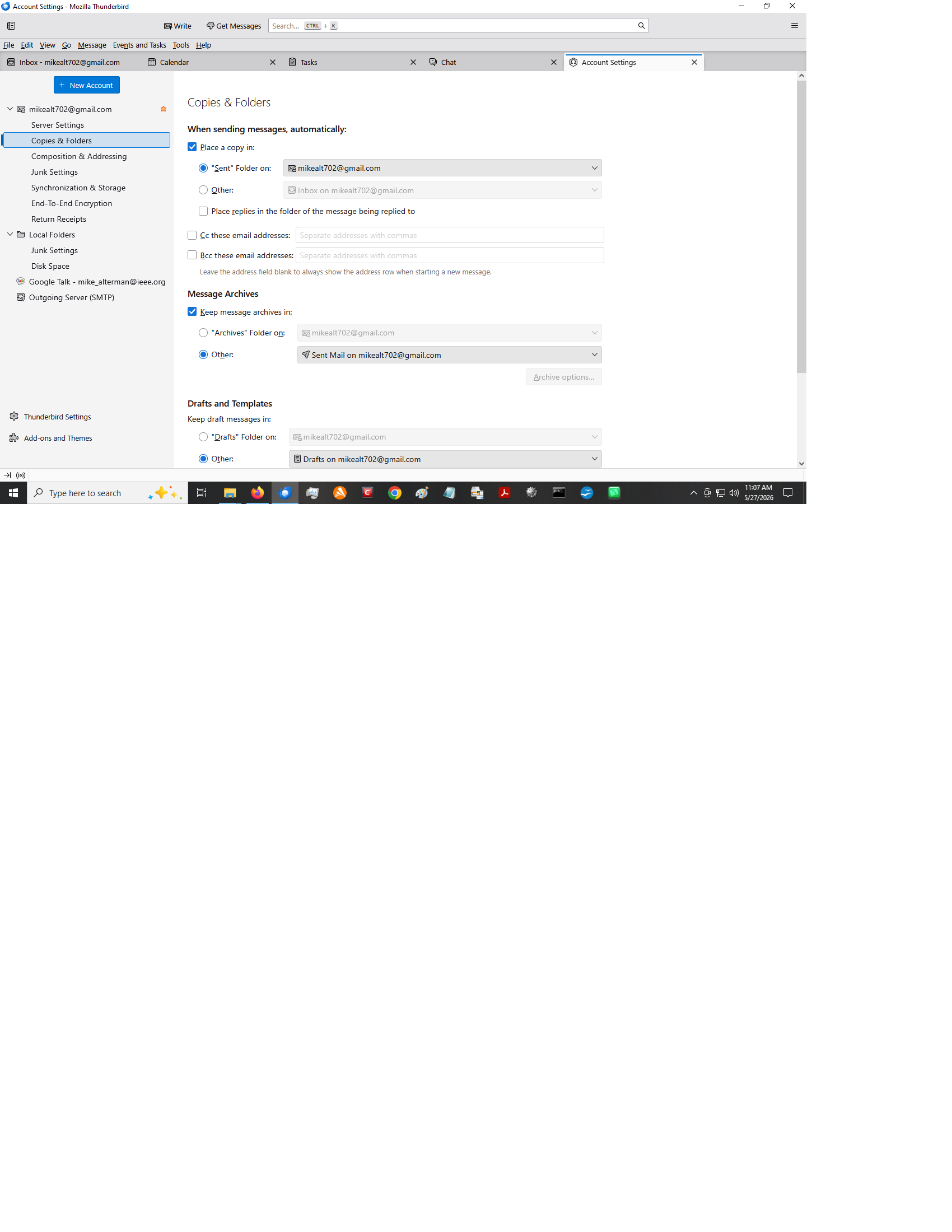
Just to verify the issue, I suggest logging on to gmail.com and sending an email from there and then checking to see where the sent message appears. Do that with thunderbird not running. I think that should at least clarify what is happening.

Запитати

Щоб відповідати на повідомлення, ви повинні ввійти у свій обліковий запис. Поставте нове питання, якщо ви ще не маєте облікового запису.