Ця тема перенесена в архів.
Якщо вам потрібна допомога, запитайте.

Архівовано
How to display categories in messages (applied in Thunderbird for Windows)

Hello. How to display categories in messages (applied in Thunderbird for Windows) ? On Thunderbird for windows messages are displayed withe the color of the category. Best regards.
Hello.
How to display categories in messages (applied in Thunderbird for Windows) ?
On Thunderbird for windows messages are displayed withe the color of the category.
Best regards.
Усі відповіді (1)

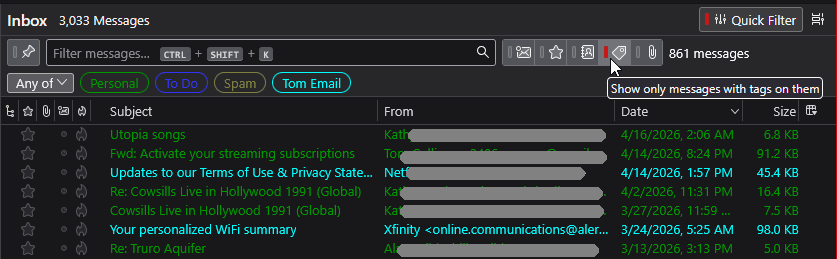
I may not understand your question, but I'll interpret it as best I can: you want to filter the message list to see only those that have Tags, as are defined in <Settings | General | Tags>?
- Show the Quick Filter toolbar: look at menu item <View | Toolbars | Quick Filter Bar>. You will now see five icons that allow you to filter the message list by various categories, one of which is "Tags". You can choose to show any or all tags. See the attached image.