


tbd does not insert addresses from addressbook
I run TBD 140.8.0 esr (64 bit) under Debian 12 Linux. Until recently I could automatically enter a special address from the pertaining addressbook, this does not work anymore. helpfiles do not show a solution thus I am here.
The addressbook is full of addresses however I have to transfer a special address via past and copy into the addressfield of the mail I want to send.
Thanks for a quick answer Jörg Kampmann
Усі відповіді (3)

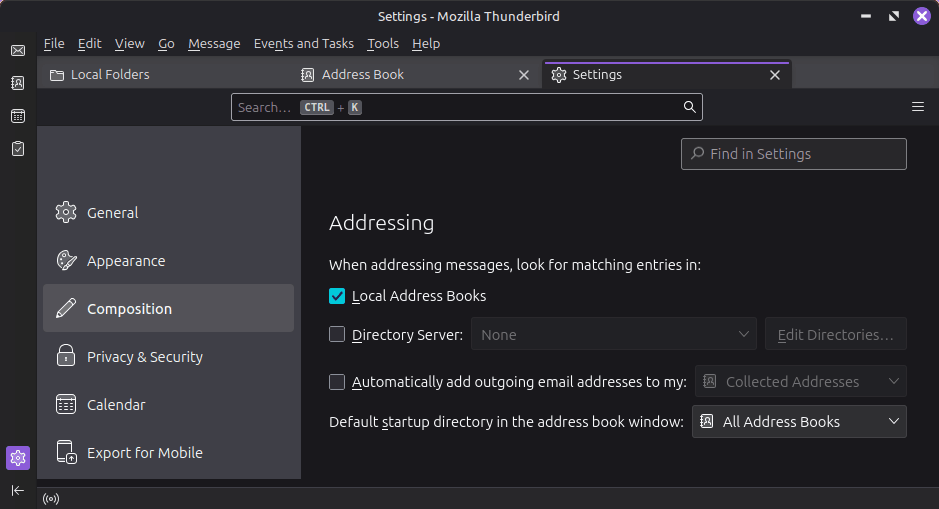
Check the setting in <Edit | Settings | Composition | Addressing> and enable the "When addressing messages, look for matching entries in: Local Address Books" option.
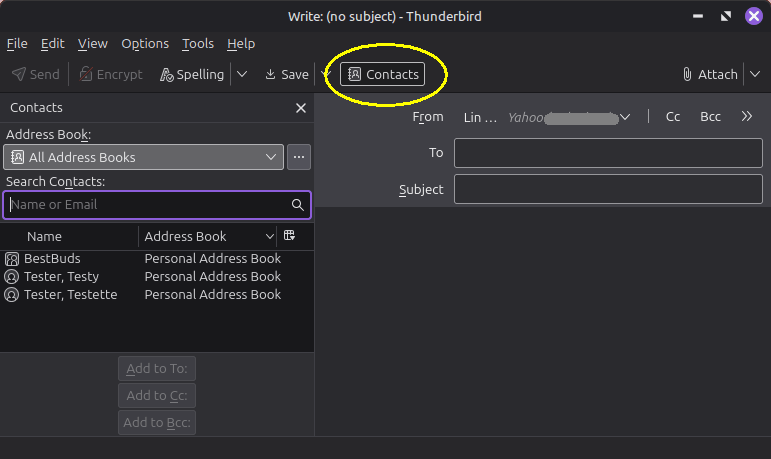
Also, when you're in the Write window, you can toggle the "Contacts" button to show a mini-address book - select an entry and double-click or click the "Add to" an entry to add it to the message.
see the screen shots below.
Dear Lin, Thanks for you prompt reply ... I did the proposed procedure. however it did not work, whatever I did. it used to work in former versions of tbd. do you have an explanation? kind regards Jörg
Can you describe in detail what your process is and where it fails? Maybe I don't understand what you mean by "special address from the pertaining addressbook".
It works for me using Thunderbird 140.9.1esr in Windows 10 and 11, and Ubuntu Linux 25 and Mint Linux 22.3, both of which I believe are Debian-based. I have the "When addressing messages, "look for matching entries in: Local Address Books" option turned on. When I'm creating a message, I start typing a name or an email address in the To, CC, or BCC boxes, and a drop-down list appears with some choices from my address books. Is this not how it works for you?
Maybe it's a Debian-specific bug?