


Thunderbird will load but immediately os 'Not Responding'

Whilst using TB the screen went white with dozens of little tabs along the top of the screeen with what look like page icons, as the app became 'not responding'. Re-loading didn't help - same screen. Re-starting didn't help. I uninstalled and re-installed TB but it is stil the same. Opening in Windows (11) safe mode produced virtually the same result except for a few seconds I was able to open the hamburger menu and select trouble shooting. Opened in trouble shooting mode showed several alerts of 'failed to connect with servers' (outlook.office365.com imap.gmail.com and Yahoo). Then it shut down as before 'not responding'. When open, TB is using some 80% of available memory., and I can only close it by using Task Manager. I'm a complete dunce at this stuff so, if anyone knows a way out of this hole, please use simple English! Thanks, Jeff
Усі відповіді (9)
You seem to open all your messages in NEW tabs when you want to read them and then never close a single tab. Thunderbird has an automatic session restore feature, which means that all tabs (and windows) still open when you quit Thunderbird (TB) will be reloaded on the next TB start. If there are too many tabs or windows to load Thunderbird will slow down and become unresponsive. The index data for all those opened tabs are stored in the session.json file in the TB profile, so you must open the profile folder and delete this file. If at TB start up you succeed to go immediately to Help > Troubleshooting Information > Profile Folder > Open Folder before TB freezes you will see the Profile folder displayed in the Explorer. Now quit TB, search for the session.json file, delete it and restart TB.
If TB freezes before you can navigate to the Help menu, you'll have to follow instructions described in this article https://support.mozilla.org/en-US/kb/profiles-where-thunderbird-stores-user-data#w_finding-your-profile-without-opening-thunderbird to navigate to the folder "Profiles" containing probably a folder "xxxxxxxx.default" and a second folder named "yyyyyyyy.default-release". Open the latter, search for the session.json file, delete it and restart TB.
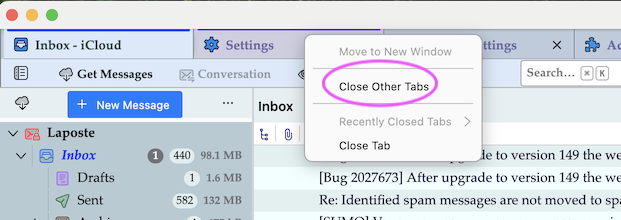
Maybe you should first try a different approach from the one I ^proposed in my first reply. on Thunderbird startup as soon as the main window is displayed on your screen R-click on the tab bar and choose "Close Other Tabs" (image)
80% of available memory is how much, in numbers? Post your computer model and CPU, found at Computer > Properties.
Hi Mapenzi, Thanks for your suggestions. I tried right-clicking the tab bar and it did, indeed, get rid of all the tabs but left me with a completely blank, white home page. I then found the .default-release files (there were 2), closed TB, and deleted the session.json files in each folder. On re-opening TB nothing had changed - and all the tabs were back! So I'm still stuck - plus now when I open TB it appears to stop the whole computer working.
Hi Wayne Mery, My desktop is an Acer XC-895 with an IntelCore iS-10400 CPU @ 2.9 GHz, with 8Gb of installed RAM. When TB runs it takes 4957Mb of memory, according to Task Manager.
So I'm still stuck, guys. Any furhter suggestions? Thanks, Jeff
Deleting the session.json files in both profile folders should have worked! Maybe you hadn't closed Thunderbird when you deleted those files. Try again: open the folder Profiles in \Appdata\Roaming\Thunderbird\ , verify that Thunderbird is closed. Delete the session.json AND the session.json.backup files in both profile folders .default-release and default-release-1 Restart Thunderbird
Sorry, Mapenzi, it hasn't worked. I found a sessions.json backup file and deleted that but TB homepage is still one big white space with lots of tabs, not responding, and using 4500Mb of memory.
This is so serious for me. I have been using TB for a decade and all my files are stored there - which I now cannot access.
Start Thunderbird in 'troubleshoot mode' : hold down the Shift key and launch Thunderbird https://support.mozilla.org/en-US/kb/troubleshoot-mode-thunderbird#thunderbird:win11:tb149
It opens but is substantially the samemm although, in troubleshoot mode it shows the 'Today' pane which is absent when opened normally. The Home page is still one big blank though. And when it's open it stops the computer dead, so I have to close it with Task Manager
Deleting session.json will help reduce clutter, but I strongly disagree that it's likely to consume much resources in memory or cpu.
I see two likely possibilities:
- there are recent reports that failed network can create high memory usage.
- corrupt mail folder index(s) and/or folders
The most likely source of corruption is in Inboxes, or other high usage folders like Spam and Trash. If your accounts are imap, you can delete the files related to these accounts from your Thunderbird profile https://support.mozilla.org/en-US/kb/profiles-where-thunderbird-stores-user-data. They will be in account folders under ImapMail directory.