


All Messages shows date in April

Dear Community,
I have installed Thunderbird on a new system and imported my mailbox and archives from my old Mac (both running macOS). I am currently using macOS Monterey 12.7.6 and Thunderbird 40.5.0 ESR (64-bit).
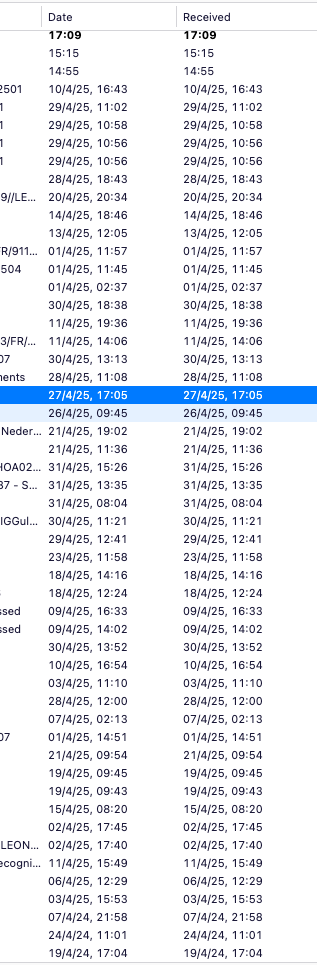
All messages—whether imported or newly received—both in the Inbox and in archives are showing the month as April (i.e., xx/4/xx). This issue also appears in the email body when replying or forwarding messages. Please note that the day and year are correct, only the month appears incorrectly as “4” (April)on all messages.
Messages in the imported local folder archives display the correct dates. I have email folders going back to 2006, and I would greatly appreciate your guidance to resolve this issue.
Many thanks in advance, Leonardo
Усі відповіді (6)

Try R. click Inbox > Properties > Repair folder.
Hi Ed,
Many thanks for your answer and support .
I've tried before and does not work , seems that the clicking repair does not do anything at all .
I've tried to upload here a screen recording on .MOV and MP4 but would not allow
your help is highly appreciated
leonardo17 said
Hi Ed, Many thanks for your answer and support . I've tried before and does not work , seems that the clicking repair does not do anything at all . I've tried to upload here a screen recording on .MOV and MP4 but would not allow your help is highly appreciated
Does Troubleshoot mode make any difference?
Hi Ed ,
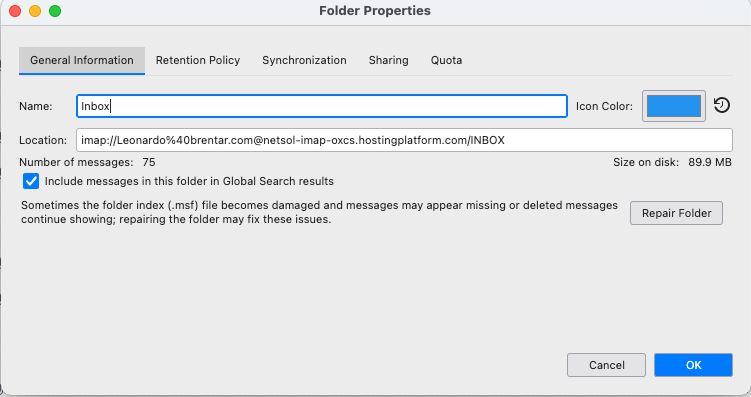
Thanks for your answer and interest , nothing happens also on troubleshoot mode , actually not even the "Repair Button" is highlighted .
Any assistance is highly appreciated
RGds

leonardo17 said
not even the "Repair Button" is highlighted.
The "Repair Folder" button is not highlighted because it is not the default button. It should still function.
I don't think you see any activity after clicking repair. I'm out of ideas except for seeing if a new profile works.