


Adding an internal range to firefox intune policy management for access control

Hi All, I want to block traffic on firefox externally for managed devices via Intune, following the import of the ADMX/ADML files into intune.
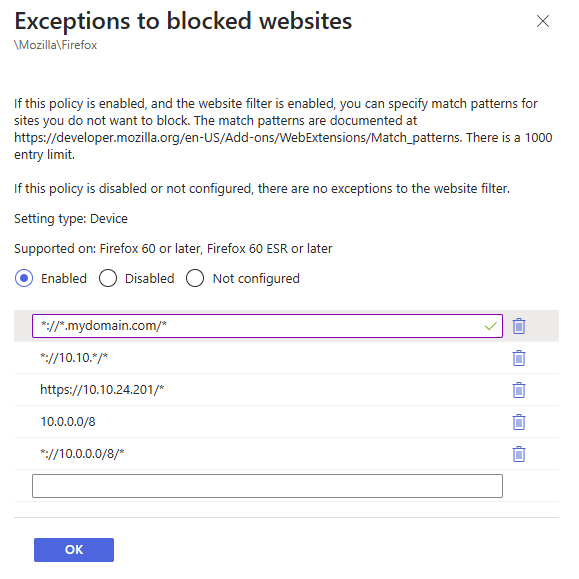
I have set '\Mozilla\Firefox\Exceptions to blocked websites' to the following
which works, however, I also want to add hosts that are only resolving on IPs and not DNS. I can add specific IPs if known, but is there a way I can allow IP ranges? Ie
- //10.10.*/* (this doesn't currently work)
Of the included screenshot, only the wildcard for mydomain.com and the specific IP currently work
If there is a better way to do this via intune for firefox only, please let me know.
Thanks
Вибране рішення
We've kind of got this to work, and it appears to be (with the other setttings) blocking access to sites not defined by DNS or IP range
Proxy Passthrough \Mozilla\Firefox\Proxy Settings 10.0.0.0/8, http://domain.com/* , <local>
HTTP Proxy
\Mozilla\Firefox\Proxy Settings > enabled
127.0.0.1:80
HTTPS Proxy \Mozilla\Firefox\Proxy Settings > enabled 127.0.0.1:443
Змінено matthew89
Усі відповіді (4)
Did you read this as well.
https://support.mozilla.org/en-US/kb/managing-firefox-intune
markwarner22 said
Did you read this as well. https://support.mozilla.org/en-US/kb/managing-firefox-intune
Thank you for replying. Yes, I have read the page you posted. I have created a configuration profile, which is partially working, with all sites being blocked except mydomain.com.
The problem is I want to specify an IP range, which is not working.
Змінено matthew89
You can ask a question on the Firefox for Enterprise forum where you may get additional help. Use this link: https://support.mozilla.org/en-US/questions/new/firefox-enterprise/form
I would move this thread to Firefox for Enterprise but an Agent already processed this thread so that can no longer be done due to a forum bug that needs fixing.
Вибране рішення
We've kind of got this to work, and it appears to be (with the other setttings) blocking access to sites not defined by DNS or IP range
Proxy Passthrough \Mozilla\Firefox\Proxy Settings 10.0.0.0/8, http://domain.com/* , <local>
HTTP Proxy
\Mozilla\Firefox\Proxy Settings > enabled
127.0.0.1:80
HTTPS Proxy \Mozilla\Firefox\Proxy Settings > enabled 127.0.0.1:443
Змінено matthew89