


reduce email disk space - two Sent folders

Aiming to reduce memory used by my email. I have both Sent and Sent Mail folders. My preference would be to eliminate the duplication that takes place with the two. I understand that I can not unsubscribe from Sent Mail. Could Sent content be reduced to the items that are NOT in Sent Mail? Alternatives? My Sent folder contains more older files which I would like to retain but do not want to "try" something that MIGHT eliminate them. I am on a Mac23 with Latest Sonoma. Thunderbird on Gmail.
Змінено Wayne Mery
Обране рішення
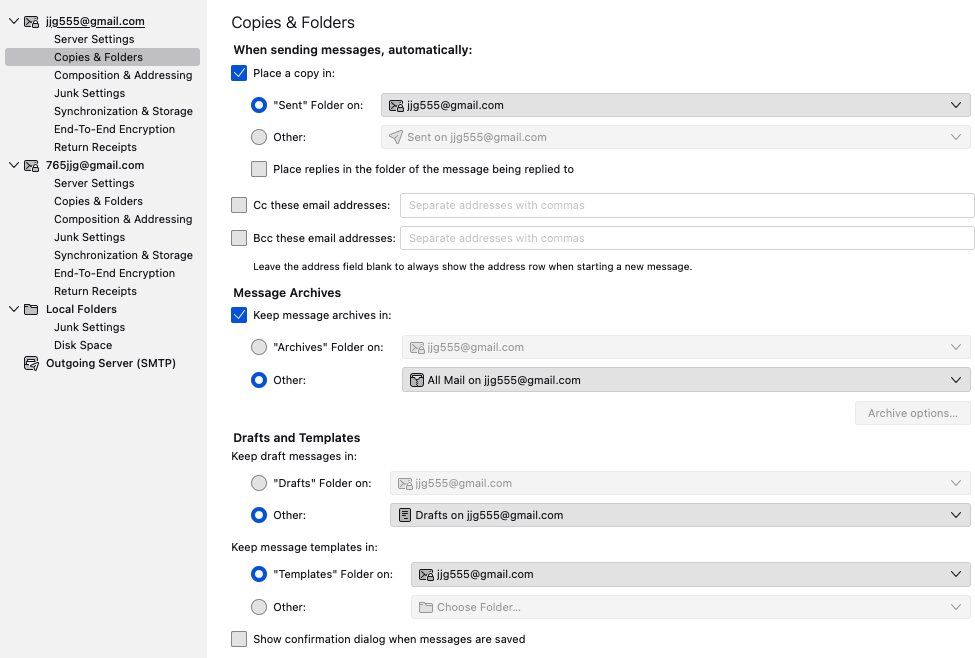
UNtick the setting to save in sent folder. that will stop causing the extra message to be saved. Gmail saves the message anyway.
Читати цю відповідь у контексті 👍 1Усі відповіді (8)
what are your settings in account settings>copies&folders for the Gmail account, specifically the option on saving Sent messages?
Hi David; Many thanks for your response. I see where you are leading toward, but unfortunately I have not found a way to check as per your recommendation. I get to Gmail account settings: Manage email preferences but that is empty- no details shown. Trying to figure out how to dig deeper but for now I am stuck.
- from main pane, click menu and then 'account settings'
- locate gmail account in left side and under that is 'copies&folders' click that
- what is selected for saving the Sent folder?
Sorry, I just do not seem to get through the recommended sequence.... somewhere else, it is said that Gmail does not have Folders, but it has Labels.....
So, I used the Gmail page, in settings - my Account- Gmail Under system Labels, I get: [Imap]/Sent: Show in Label list: hide, show if unread Show in Message List: hide Actions: remove edit >Show in IMAP
Is this what is needed, or my inability to follow instructions has taken me astray?
Ok, try thisl:
- start thunderbird if not already running
- click the menu icon in upper right -(three short bars stacked together)
- then, click 'account settings'
- next, look for the gmail account in left side
- click 'copies&folders' for the account
- tell exactly what settings you have there for the sent folder. if possible, do a screenshot
Great thanks and apologies for being so ..... Attached is the screenshot.
Вибране рішення
UNtick the setting to save in sent folder. that will stop causing the extra message to be saved. Gmail saves the message anyway.
Many thanks, David. So, now I am not adding to Sent Folder memory part every time I sent a message now.