


Thunderbird 115 - Lost messages and conflicting message counts

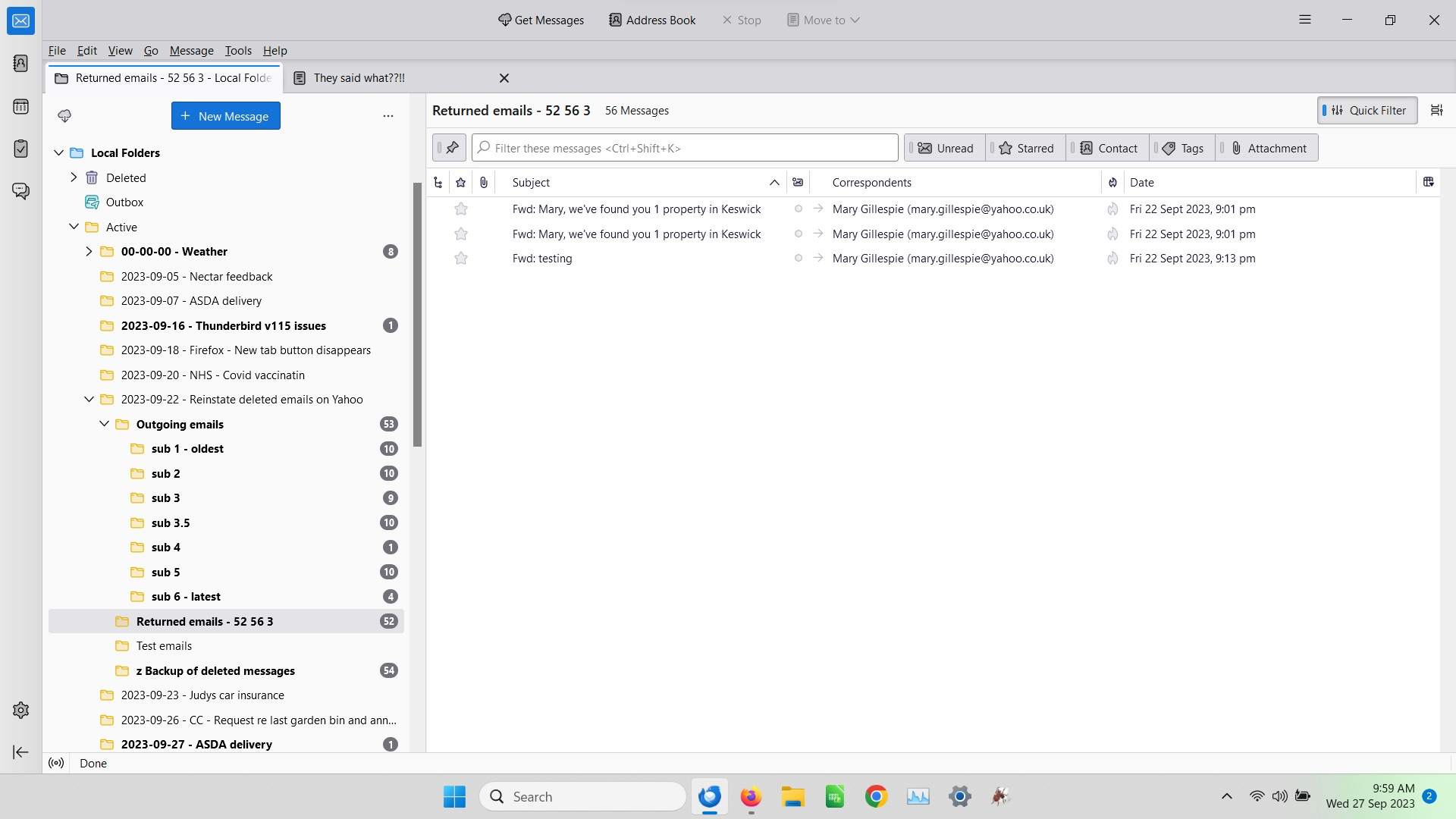
I have lost access to most messages in a folder, and the messages count in the folder pane (52) does not match the message count in the message pane (56) which does not match the number of messages listed in the message pane (3).
When previously accessing this folder i could see 50+ messages in it.
I'm not sure of the exact sequence of events. I have been moving messages between folders, and sorting on different column headers within this folder, but I don't think i've done anything more exotic than that. At one point I think i caught a glimpse of a message that included the word "selected".
Screen shot attached.
I have lost access to most messages in a folder, and the messages count in the folder pane (52) does not match the message count in the message pane (56) which does not match the number of messages listed in the message pane (3).
When previously accessing this folder i could see 50+ messages in it.
I'm not sure of the exact sequence of events. I have been moving messages between folders, and sorting on different column headers within this folder, but I don't think i've done anything more exotic than that. At one point I think i caught a glimpse of a message that included the word "selected".
Screen shot attached.
Усі відповіді (1)
PS I may have inadvertantly had two Thunderbird windows open at the same time, pointing at the same folder.