Cannot install Firefox on Windows because 7-Zip is blocked by Group Policy
This question has been asked and answered many times before (e.g., https://support.mozilla.org/en-US/questions/1088420, https://support.mozilla.org/en-US/questions/1157159, https://support.mozilla.org/en-US/questions/1110373) but none of the solutions suggested are amenable to me. I need a way of installing Firefox on Windows that does not involve 7-Zip, which is blocked by my IT department, in any form. Is it possible?
Обране рішення
I solved my own problem in the end:
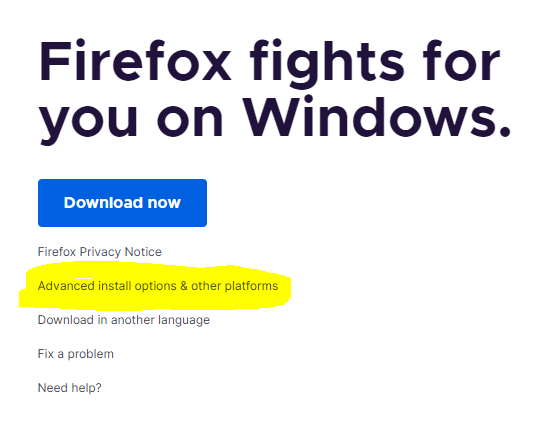
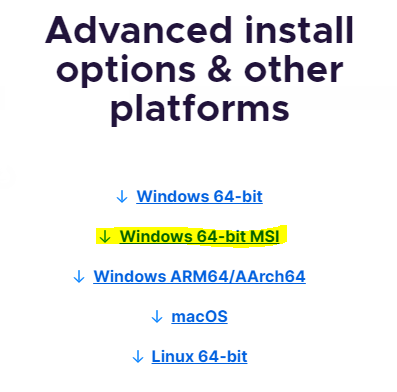
1. Go to https://www.mozilla.org/en-GB/firefox/windows/ 2. Click on "Advanced install options & other platforms" 3. Select "Windows 64-bit MSI"
... or just go straight to the MSI link: https://download.mozilla.org/?product=firefox-msi-latest-ssl&os=win64&lang=en-GB (note that this will start an automatic download).
Note that this installer was silent on my machine, so I didn't actually know when it finished; I waited for a few minutes and then saw that Firefox was present in my programs (from the Start Menu).
Читати цю відповідь у контексті 👍 0Усі відповіді (3)
You can copy the Firefox installation folder from one device to this device, so you do not need to use the installer.
Thanks for the reply - that sounds worth a try. When you say the "Firefox installation folder", which folder are you talking about exactly?
Вибране рішення
I solved my own problem in the end:
1. Go to https://www.mozilla.org/en-GB/firefox/windows/ 2. Click on "Advanced install options & other platforms" 3. Select "Windows 64-bit MSI"
... or just go straight to the MSI link: https://download.mozilla.org/?product=firefox-msi-latest-ssl&os=win64&lang=en-GB (note that this will start an automatic download).
Note that this installer was silent on my machine, so I didn't actually know when it finished; I waited for a few minutes and then saw that Firefox was present in my programs (from the Start Menu).