

Ця тема перенесена в архів.
Якщо вам потрібна допомога, запитайте.

Вирішено
Архівовано
Outlook.com sign in screen non-functional
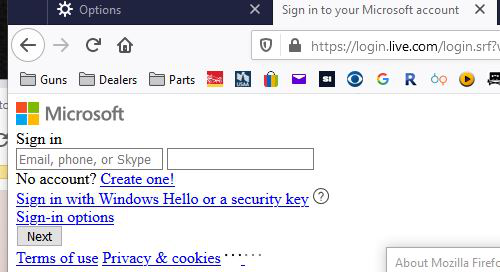
After updating to 76 on Windows 10, the outlook.com sign on screen comes up as shown in the attachment. I've done a complete reset of Firefox, cleared the cache and tried safe mode. It was working fine until I closed Firefox and it completed the update. Outlook.com is working fine in Chrome.
After updating to 76 on Windows 10, the outlook.com sign on screen comes up as shown in the attachment. I've done a complete reset of Firefox, cleared the cache and tried safe mode. It was working fine until I closed Firefox and it completed the update. Outlook.com is working fine in Chrome.
Усі відповіді (2)
You get this issue when CSS files are blocked. It is possible that your security software is blocking content.
What security software do you have ?
Boot the computer in Windows Safe mode with network support to see if that has effect in case security software is causing problems.
Вибране рішення
I think it was actually an issue with the site. I tried a few hours later and it worked.