


Windows 10 reached EOS (end of support) on October 14, 2025. If you are on Windows 10, see this article.

Шукати в статтях підтримки

Остерігайтеся нападів зловмисників. Mozilla ніколи не просить вас зателефонувати, надіслати номер телефону у повідомленні або поділитися з кимось особистими даними. Будь ласка, повідомте про підозрілі дії за допомогою меню “Повідомити про зловживання”

Докладніше
Ця тема перенесена в архів. Якщо вам потрібна допомога, запитайте.
Архівовано

Download files directly without showing the Opening window

Theodorax відповів
Sourav

Hi, whenever I want to download something, Firefox shows me a Opening window. If I mistakenly select the "Open with" button, a file is downloaded to my /tmp/ directory and then opened with an application, which takes a huge amount of RAM for stuff like iso.

The another thing is that it's very annoying and takes a lot of time if you want to download many files from many websites. You have to manually choose save file for all the files you download, and the "Do this automatically for files like this from now on" option is greyed out.

Is there a way disable the "Opening" window and just download the files I wish to download?
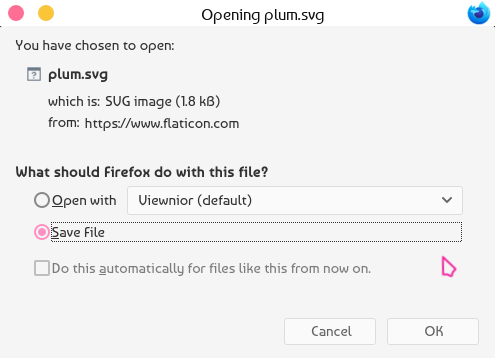
Hi, whenever I want to download something, Firefox shows me a Opening window. If I mistakenly select the "Open with" button, a file is downloaded to my /tmp/ directory and then opened with an application, which takes a huge amount of RAM for stuff like iso. The another thing is that it's very annoying and takes a lot of time if you want to download many files from many websites. You have to manually choose save file for all the files you download, and the "Do this automatically for files like this from now on" option is greyed out. Is there a way disable the "Opening" window and just download the files I wish to download?
Вкладені знімки екрана

Змінено Sourav

Усі відповіді (1)

Dear Sourav,

Thank you for contacting Firefox Support about the issue you've experienced.

We are investigating the issue now and will return you as quickly as we can.

Best regards, Firefox Team