


Toolbar icons for reinstalled extensions are present but invisible
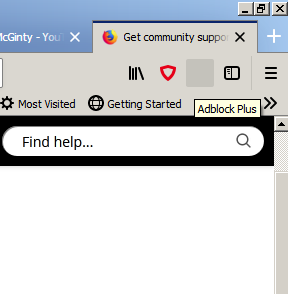
Following the fix for the recent "disable all extensions" problem, I reinstalled some extensions. The buttons for these extensions are present on the toolbar but have no visible icons. The attached screenshot was taken with the mouse over the Adblock Plus button. The button is shown as a square of a grey that's slightly darker than the background & the tooltip text is also shown but the Adblock Plus icon isn't visible on the button. The buttons for all the reinstalled extensions are similarly lacking their icons. Extensions that were *not* reinstalled but were only re-enabled by the fix do display their icons (e.g., the red shield outline visible immediately left of the grey Adblock Plus button). How do I persuade Firefox to display the missing icons?
Вибране рішення
Reinstalling & restarting were pretty much the first things I tried when I noticed the problem. They sometimes do solve problems but they made no difference.
However, I gave reinstalling another try a few minutes ago & they did work this time.
It's worth noting that Adblock Plus was definitely working even when its icon couldn't be seen. It *was* keeping the ads away. (The other affected extensions are the "on demand" type & I'd no opportunity to test whether or not they would work, as the relevant situations hadn't arisen.)
Змінено NeilFKMcLachlan
Усі відповіді (3)

Hello,
Click on the icon and there must be a menu that appears with written "hide in the chrome menu".
If doesn't work reinstall the extension.
Bye
Змінено Timotax

Maybe just close the Browser and Restarting may bring them back or try a 'Restart With Add-ons Disabled' and Restart again?
~Pj
Вибране рішення
Reinstalling & restarting were pretty much the first things I tried when I noticed the problem. They sometimes do solve problems but they made no difference.
However, I gave reinstalling another try a few minutes ago & they did work this time.
It's worth noting that Adblock Plus was definitely working even when its icon couldn't be seen. It *was* keeping the ads away. (The other affected extensions are the "on demand" type & I'd no opportunity to test whether or not they would work, as the relevant situations hadn't arisen.)
Змінено NeilFKMcLachlan