


Windows 10 reached EOS (end of support) on October 14, 2025. If you are on Windows 10, see this article.

Avatar for Username

Шукати в статтях підтримки

Остерігайтеся нападів зловмисників. Mozilla ніколи не просить вас зателефонувати, надіслати номер телефону у повідомленні або поділитися з кимось особистими даними. Будь ласка, повідомте про підозрілі дії за допомогою меню “Повідомити про зловживання”

Докладніше
Ця тема перенесена в архів. Якщо вам потрібна допомога, запитайте.
Архівовано

Moving emails to another folder hides the target folder [linux]

CBFJ відповів
CBFJ

In Thunderbird 60.0, when moving emails, a "thumbnail" of the email lines is showing, which will hide the highlighting of the destination folder.

In older version, I could easily move several emails from one folder to another and see the highlighting of the destination folder.

How can I change this back to the previous way?

When only moving one email, this is not a big issue (still a little one), but when moving several, it is, as I cannot know for sure at which folder I'm pointing. (Screenshot attached)

I've found that, if I drag in the left side of the lines, or at the top or bottom line, I can avoid hiding the destination folder, but this is not a very convenient way of organising my emails.
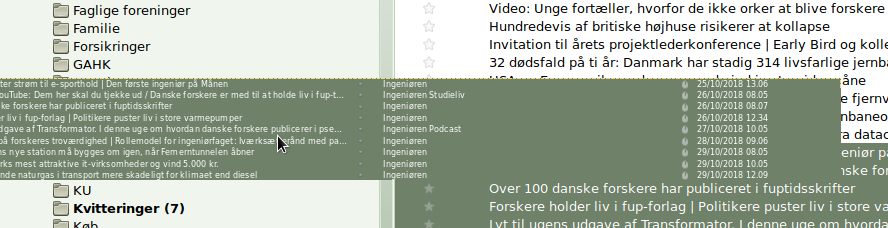
In Thunderbird 60.0, when moving emails, a "thumbnail" of the email lines is showing, which will hide the highlighting of the destination folder. In older version, I could easily move several emails from one folder to another and see the highlighting of the destination folder. How can I change this back to the previous way? When only moving one email, this is not a big issue (still a little one), but when moving several, it is, as I cannot know for sure at which folder I'm pointing. (Screenshot attached) I've found that, if I drag in the left side of the lines, or at the top or bottom line, I can avoid hiding the destination folder, but this is not a very convenient way of organising my emails.
Вкладені знімки екрана

Змінено Wayne Mery

Усі відповіді (1)

Yes, this helps. Thank you.