


When I try to enter an address in the "to" section, the address comes out in hyroglyphics.

This applies whether I am creating a new message, or forwarding a message.
Обране рішення
Thanks for your efforts but it looks as though I have solved this problem. I opened my address book this morning and noticed that one of the address books was labelled "outlook". It had 43,000+ contacts. My own address book which I am rebuilding has 50 addresses. I deleted the Outlook address book and it looks as though that has fixed things.
Читати цю відповідь у контексті 👍 0Усі відповіді (11)
enter it how? Do you see the same in Safe mode?
Restart Thunderbird with add-ons disabled (Thunderbird Safe Mode). On the Help menu, click on "Restart with Add-ons Disabled". If Thunderbird works like normal, there is an Add-on or Theme interfering with normal operations. You will need to re-enable add-ons one at a time until you locate the offender.
Thanks for the reply Matt but it hasn't worked. I restarted in Safe Mode with add-ons disabled. Same result - hieroglyphics in the address line when I tried to enter someone's name to send to. I have removed the programme and re-installed to no avail. - same result. My computor runs windows 10.
What anti-virus do you use?
you open a new Write message In a TO field you type eg; S and you should get a drop down of various possible email addresses to select from. But you are saying when you type 'S', you do not get an 'S'. Please post an image showing what happens when you type an 'S' in the TO field.
Do you also get hieroglyphics when you type in the 'Subject' area and the 'Content' area?
Hi Matt I tried again this morning and typed "pe" into the address to field. After a few seconds delay the jumble filled in the space. I have been unable to post the script that came. I can write in the contents and subject fields without any problems I use Trend Micro Internet Security - paid version
I think a picture might be worth a thousand words here.
Please provide us with a screenshot. If you need help to create a screenshot, please see How do I create a screenshot of my problem?
Once you've done this, attach the saved screenshot file to your forum post by clicking the Browse... button below the Post your reply box. This will help us to visualize the problem.
Screen shot below. I can reply to messages but the minute I have to add an address, the funny stuff starts. Perhaps my address book is corrupt?
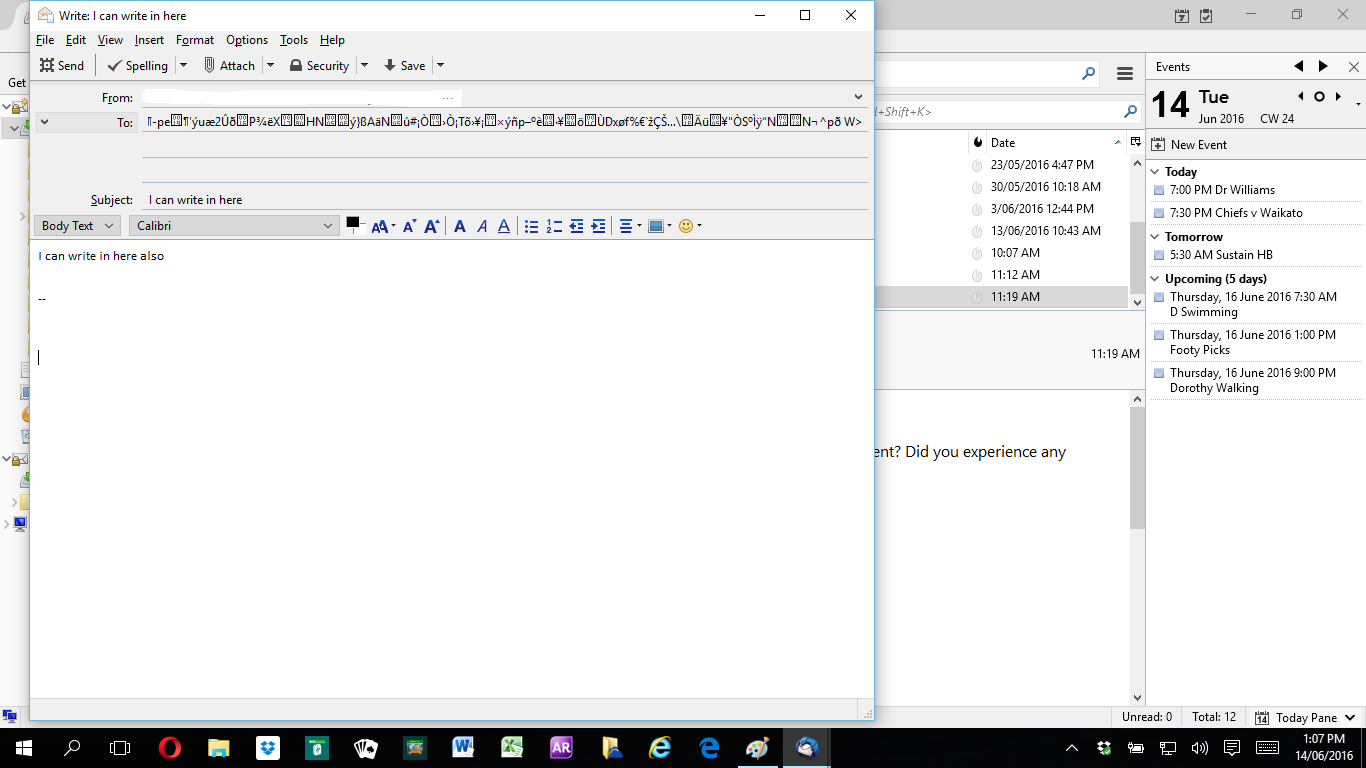
I get spam that looks like that, in its subject line. I'd assumed some half-baked attempt at fancy encoding. But I don't know how that would get into a local address book file. Curious.
That looks like Unicode being rendered as ansi.
But what could be the cause?
My windows 10 has eng just to the left of the ate and time. Click that and select Language preferences What setting do your have?
Please add the troubleshooting information to your post To find the Troubleshooting information:
- Open Help (or click on three-line-icon and select Help)
- Choose Troubleshooting Information
- Use the button Copy to clipboard to select all. Do not check box "Include account names"!
- Paste this in your post.
Language appears to be unicode Troubleshooting herewith:
Application Basics
   Name: Thunderbird
   Version: 45.1.1
   User Agent: Mozilla/5.0 (Windows NT 10.0; WOW64; rv:45.0) Gecko/20100101 Thunderbird/45.1.1
   Profile Folder: Show Folder
             (Local drive)
   Application Build ID: 20160526140950
   Enabled Plugins: about:plugins
   Build Configuration: about:buildconfig
   Memory Use: about:memory
 Mail and News Accounts
   account1:
     INCOMING: account1, , (imap) imap-mail.outlook.com:993, SSL, passwordCleartext
     OUTGOING: , smtp-mail.outlook.com:587, alwaysSTARTTLS, passwordCleartext, true
   account2:
     INCOMING: account2, , (none) Local Folders, plain, passwordCleartext
   account3:
     INCOMING: account3, , (imap) imap.gmail.com:993, SSL, OAuth2
     OUTGOING: , smtp.gmail.com:465, SSL, OAuth2, true
Crash Reports
 Extensions
   Lightning, 4.7.1.1, true, {e2fda1a4-762b-4020-b5ad-a41df1933103}
Important Modified Preferences
Name: Value
     accessibility.lastLoadDate: 1465885462
     browser.cache.disk.capacity: 358400
     browser.cache.disk.filesystem_reported: 1
     browser.cache.disk.smart_size_cached_value: 358400
     browser.cache.disk.smart_size.first_run: false
     browser.cache.disk.smart_size.use_old_max: false
     dom.apps.reset-permissions: true
     extensions.lastAppVersion: 45.1.1
     font.name.monospace.el: Consolas
     font.name.monospace.x-cyrillic: Consolas
     font.name.monospace.x-unicode: Consolas
     font.name.monospace.x-western: Consolas
     font.name.sans-serif.el: Calibri
     font.name.sans-serif.x-cyrillic: Calibri
     font.name.sans-serif.x-unicode: Calibri
     font.name.sans-serif.x-western: Calibri
     font.name.serif.el: Cambria
     font.name.serif.x-cyrillic: Cambria
     font.name.serif.x-unicode: Cambria
     font.name.serif.x-western: Cambria
     font.size.fixed.el: 14
     font.size.fixed.x-cyrillic: 14
     font.size.fixed.x-unicode: 14
     font.size.fixed.x-western: 14
     font.size.variable.el: 17
     font.size.variable.x-cyrillic: 17
     font.size.variable.x-unicode: 17
     font.size.variable.x-western: 13
     mail.openMessageBehavior.version: 1
     mail.winsearch.enable: true
     mail.winsearch.firstRunDone: true
     mail.winsearch.global_reindex_time: 1462176672
     mailnews.database.global.datastore.id: 41120318-d003-4eea-9ed3-84a973784ca
     network.cookie.prefsMigrated: true
     network.predictor.cleaned-up: true
     places.database.lastMaintenance: 1465715486
     places.history.expiration.transient_current_max_pages: 104858
     plugin.importedState: true
Graphics
     Adapter Description: Intel(R) HD Graphics 4000
     Vendor ID: 0x8086
     Device ID: 0x0166
     Adapter RAM: Unknown
     Adapter Drivers: igdumdim64 igd10iumd64 igd10iumd64 igdumdim32 igd10iumd32 igd10iumd32
     Driver Version: 10.18.10.4276
     Driver Date: 8-17-2015
     Adapter Description (GPU #2): NVIDIA GeForce 710M
     Vendor ID (GPU #2): 0x10de
     Device ID (GPU #2): 0x1140
     Adapter RAM (GPU #2): 2048
     Adapter Drivers (GPU #2): nvd3dumx,nvwgf2umx,nvwgf2umx,nvwgf2umx nvd3dum,nvwgf2um,nvwgf2um,nvwgf2um
     Driver Version (GPU #2): 10.18.13.5354
     Driver Date (GPU #2): 7-13-2015
     Direct2D Enabled: false
     DirectWrite Enabled: false (10.0.10586.0)
     ClearType Parameters: ClearType parameters not found
     WebGL Renderer: Google Inc. -- ANGLE (Intel(R) HD Graphics 4000 Direct3D11 vs_5_0 ps_5_0) -- OpenGL ES 2.0 (ANGLE 2.1.0.316930d51ea9)
     GPU Accelerated Windows: 0
     AzureCanvasBackend: skia
     AzureSkiaAccelerated: 0
     AzureFallbackCanvasBackend: cairo
     AzureContentBackend: cairo
JavaScript
Incremental GC: 1
Accessibility
   Activated: 1
   Prevent Accessibility: 0
Library Versions
     Expected minimum version
     Version in use
     NSPR
     4.12
     4.12
     NSS
     3.21.1 Basic ECC
     3.21.1 Basic ECC
     NSS Util
     3.21.1
     3.21.1
     NSS SSL
     3.21.1 Basic ECC
     3.21.1 Basic ECC
     NSS S/MIME
     3.21.1 Basic ECC
     3.21.1 Basic ECC
Вибране рішення
Thanks for your efforts but it looks as though I have solved this problem. I opened my address book this morning and noticed that one of the address books was labelled "outlook". It had 43,000+ contacts. My own address book which I am rebuilding has 50 addresses. I deleted the Outlook address book and it looks as though that has fixed things.
Well that sounds like classic garbage in garbage out. Obvious, but something none of us consider these data. Good you got a solution.