

Ця тема перенесена в архів.
Якщо вам потрібна допомога, запитайте.

Вирішено
Архівовано
Inbox entries showing up as blank lines

Hi, TB 38.7.2 (newly updated). Max OS X Yosemite The message entries in my inbox show up as blank lines. I can click on lines to display messages, but obviously because the lines are blank, I can't tell what any message is until I click on it. The other mailboxes (sent, Drafts, etc.) display just fine, only Inbox has the problem. Kindly help me fix this.
Hi, TB 38.7.2 (newly updated). Max OS X Yosemite
The message entries in my inbox show up as blank lines. I can click on lines to display messages, but obviously because the lines are blank, I can't tell what any message is until I click on it. The other mailboxes (sent, Drafts, etc.) display just fine, only Inbox has the problem. Kindly help me fix this.
Усі відповіді (2)
Вибране рішення
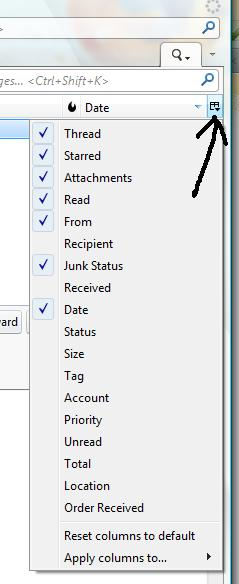
Please try this: click on the far right 'Select columns to display' icon select 'Reset columns to default'
See image below as help.
Did this resolve the issue?
Yes, that worked like a champ! (I'd been suffering for a week.)