


Firefox 33 HTML select elements do not display correctly

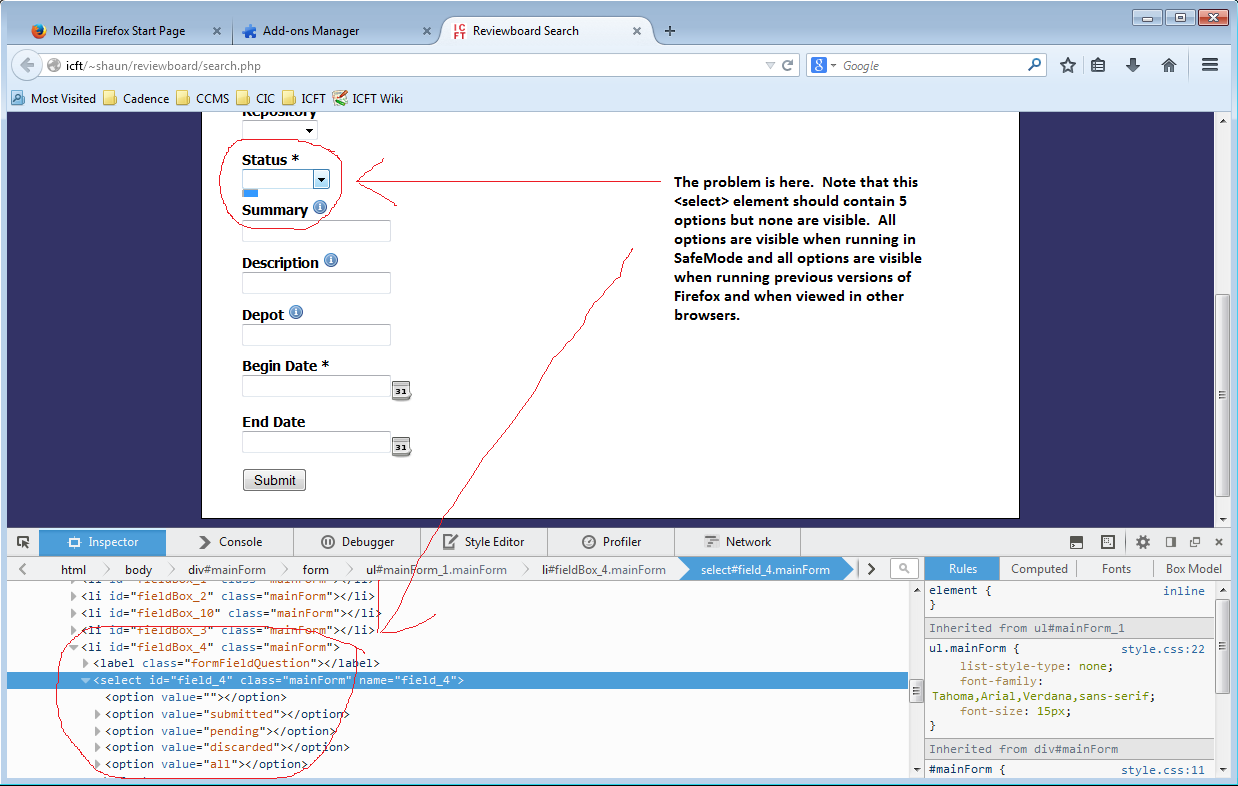
HTML form <select> elements do not display options correctly in Firefox 33.
For example: <select id="field_4" class="mainForm" name="field_4">
   <option value=""></option>
   <option value="submitted"></option>
   <option value="pending"></option>
   <option value="discarded"></option>
   <option value="all"></option>
</select>
should display a drop down with 5 elements (first one blank) but no elements at all are displayed. The bounding box does not seem to be computed correctly so no options display.
I have observed this issue on multiple pages. These pages displayed correctly in older version of Firefox and they display correctly under IE. The problem occurs with no addons or additional themes installed. The problem does not occur in SafeMode so I suspect that it is theme related but the Default 33.0 theme is the only installed theme and it cannot be disabled outside of SafeMode. I tried installing and changing multiple themes without success. The problem persists after restarting Firefox and after rebooting the computer and even after uninstalling and re-installing Firefox.
I can supply a screen shot if needed.
Змінено shaunm
Обране рішення
You can try to disable hardware acceleration in Firefox.
- Tools > Options > Advanced > General > Browsing: "Use hardware acceleration when available"
You need to close and restart Firefox after toggling this setting.
If it works in Safe Mode and in normal mode with all extensions (Firefox/Tools > Add-ons > Extensions) disabled then try to find which extension is causing it by enabling one extension at a time until the problem reappears.
Close and restart Firefox after each change via "Firefox > Exit" (Windows: Firefox/File > Exit; Mac: Firefox > Quit Firefox; Linux: Firefox/File > Quit)
Читати цю відповідь у контексті 👍 0Усі відповіді (3)
Screen shot of the problem.
Вибране рішення
You can try to disable hardware acceleration in Firefox.
- Tools > Options > Advanced > General > Browsing: "Use hardware acceleration when available"
You need to close and restart Firefox after toggling this setting.
If it works in Safe Mode and in normal mode with all extensions (Firefox/Tools > Add-ons > Extensions) disabled then try to find which extension is causing it by enabling one extension at a time until the problem reappears.
Close and restart Firefox after each change via "Firefox > Exit" (Windows: Firefox/File > Exit; Mac: Firefox > Quit Firefox; Linux: Firefox/File > Quit)
Hardware Acceleration was the culprit. Once it was disabled everything worked.