


one new icon appers on toolbar tools after updated Firefox. It says "Not logged in". What is it? How to remove it?

After I updated Firefox to ver.16.0.1, on the right corner of toolbar one small icon appeared! When I click on this, it says "not logged in". I tried to remove it by using Customize but nothing happened, it still here. I don't know what is it and how to remove it! Help me please! Thank you so much!
Seçilen çözüm
Try to drag that button back into the toolbar palette.
You can also check for problems with the localstore.rdf file.
Start Firefox in Safe Mode to check if one of the extensions (Firefox/Tools > Add-ons > Extensions) or if hardware acceleration is causing the problem (switch to the DEFAULT theme: Firefox/Tools > Add-ons > Appearance).
- Do not click the Reset button on the Safe mode start window or otherwise make changes.
- https://support.mozilla.org/kb/Safe+Mode
- https://support.mozilla.org/kb/Troubleshooting+extensions+and+themes
Tüm Yanıtlar (5)
Can you attach a screenshot?
- http://en.wikipedia.org/wiki/Screenshot
- https://support.mozilla.org/kb/how-do-i-create-screenshot-my-problem
Use a compressed image type like PNG or JPG to save the screenshot.
Is that the button for the social features?
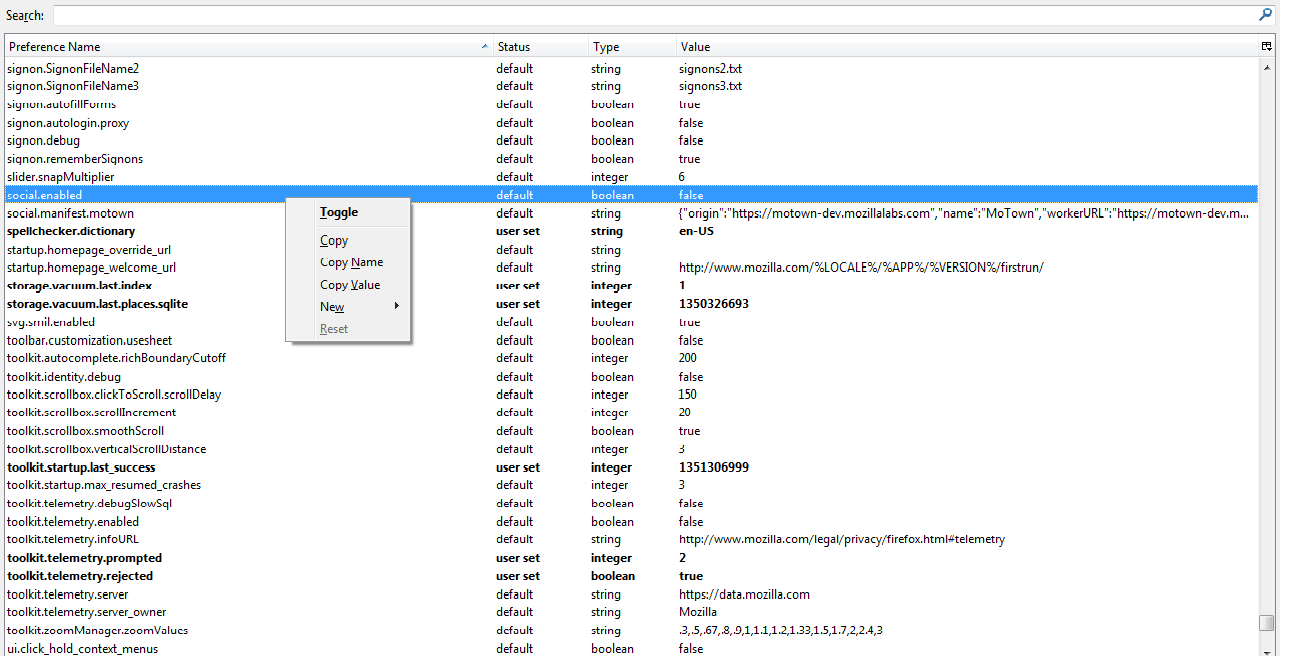
You can check the value of the social.enabled pref on the about:config page to make sure that it is set to false.
Here it is!!! Thank you so much!
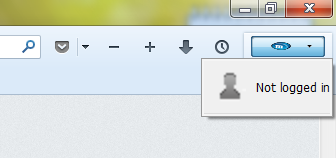
Yes, that looks like the button to access the social features that I posted above.
Did you check the social.enabled pref on the about:config page?
Thank you! In about.config, the "social.enabled" is set to false already. What should I do next?
Seçilen çözüm
Try to drag that button back into the toolbar palette.
You can also check for problems with the localstore.rdf file.
Start Firefox in Safe Mode to check if one of the extensions (Firefox/Tools > Add-ons > Extensions) or if hardware acceleration is causing the problem (switch to the DEFAULT theme: Firefox/Tools > Add-ons > Appearance).
- Do not click the Reset button on the Safe mode start window or otherwise make changes.