


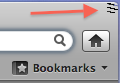
Squiggley lines in upper right hand corner

Hi, Mac 10.6.8, Firefox 10.0.1 - Dual screen setup. There are 3 squiggly lines in the upper right hand corner, but only when the browser is on the 2nd(right) screen, they are not there when it's on the main (left) screen. I'll post a reply with the screenshot.
Tüm Yanıtlar (5)
Screenshot attached.
Seçilen çözüm
Nevermind. Updated to 12.0 and they went away.
I have those 3 squiggley lines in the upper left and upper right corners.
I have most recent firefox (12.0), macbook pro, mac os 10.6.8
Didn't do anything new, but: just restarted after the battery had ran down and it did what i think was a hard shut off.
I have them too, I am on 13.0.1, release update channel.
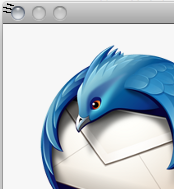
it's not a mozilla problem, I can see them in the 'force quit applications' window and the login window as well