How do I get save tabs to work on a mac in forefox 3.6.6?

How do I get Firefox 3.6.6's Save Tabs feature to work on a newly wiped iBook on which only Firefox and the OS are installed? I have tried all the suggestions and continue to be unable to save my opened tabs when quitting Firefox.
Tüm Yanıtlar (1)
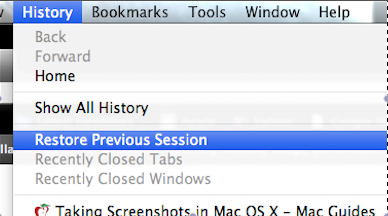
I finally figured it out. I have 6.0.2 on snow leopard however this solution should work for all mac users. When you hit command-Q or firefox-quit let the program exit then whenever you start it back up go to history and select restore previous session. I just tried it with 15 tabs open in 2 windows and it worked flawlessly. Here is a picture as well to show you where to click. One thing to keep in mind is if you have a lot of heavy data/bandwidth pages to open back up they will all load at once and will take sometime to open unless you have fios or similar. I you guys have any other problems let me know and I will see what I can do. johnbcombs@gmail.com
P.S. If your interested in video stuff feel free to check out my demo reel, other videos for school, and my resume (which will be updated this week) at johnbcombs.wordpress.com