


Mailing Lists have stopped working

Since the latest update to my Thunderbird installation (Windows 11), my previously created Mailing Lists have stopped working after always working well. Thunderbird Release: 140.7.0esr (64-bit)
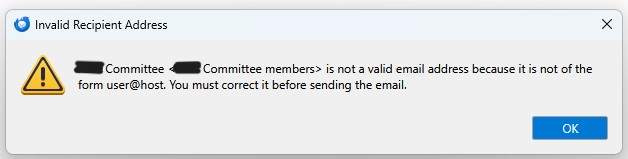
I now get the message below when I try to send an email using a mailing list address:
- Committee <*** Committee members> is not a valid email address because it is not of the form user@host. You must correct it before sending the email. (Name partially starred out for security).
Seçilen çözüm
Just found the problem, actually straightforward, but the root cause is a concern.
The mailing list name is fine with spaces in it. What I stupidly hadn't noticed was that my mailing lists have actually lost all their contents. Once I edit the lists and add back in all of the previous addresses, everything works fine again.
What I still can't explain is why my mailing lists lost their contents?
Maybe I need to backup all my mailing lists so that I can easily restore them if this issue happens again.
Bu yanıtı konu içinde okuyun 👍 0Tüm Yanıtlar (2)
Try renaming the mailing list name to have no spaces and let me know.
david tarafından tarihinde düzenlendi
Seçilen çözüm
Just found the problem, actually straightforward, but the root cause is a concern.
The mailing list name is fine with spaces in it. What I stupidly hadn't noticed was that my mailing lists have actually lost all their contents. Once I edit the lists and add back in all of the previous addresses, everything works fine again.
What I still can't explain is why my mailing lists lost their contents?
Maybe I need to backup all my mailing lists so that I can easily restore them if this issue happens again.