


Windows 10 reached EOS (end of support) on October 14, 2025. If you are on Windows 10, see this article.

Mozilla Destek’te Ara

Destek dolandırıcılığından kaçının. Mozilla sizden asla bir telefon numarasını aramanızı, mesaj göndermenizi veya kişisel bilgilerinizi paylaşmanızı istemez. Şüpheli durumları “Kötüye kullanım bildir” seçeneğini kullanarak bildirebilirsiniz.

Daha Fazlasını Öğren
Arşivlendi

How do I disable the "Suggest Firefox Relay email mask" option

cdmcclellan1

With reference to this question: https://support.mozilla.org/en-US/questions/1439281 from 2024

The answer was this: Disable "Suggest Firefox Relay email masks to protect your email address" in "Settings -> Privacy & Security -> Passwords".

But I already have this setting disabled. The popup still comes up. (BTW it's in "Preferences -> Privacy & Secutiry ->Passwords". The popup still comes up.

NO ONE IS WATCHING ME! I'm at home! (Except for that guy who sees what I do in bed /s)

Moderator note: This question has been edited to correct the link.
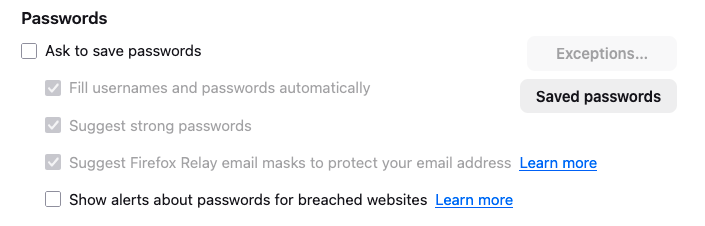
With reference to this question: https://support.mozilla.org/en-US/questions/1439281 from 2024 The answer was this: Disable "Suggest Firefox Relay email masks to protect your email address" in "Settings -> Privacy & Security -> Passwords". But I already have this setting disabled. The popup still comes up. (BTW it's in "'''''Preferences''''' -> Privacy & Secutiry ->Passwords". The popup still comes up. NO ONE IS WATCHING ME! I'm at home! (Except for that guy who sees what I do in bed /s) ''Moderator note: This question has been edited to correct the link.''
Ekli ekran görüntüleri

Denys tarafından tarihinde düzenlendi

Tüm Yanıtlar (1)

Hi,

Not sure what may be the reason, but could you please check "Ask to save passwords", uncheck the Relay option (as it should become available) and then uncheck "Ask to save passwords" again? Does it help?