


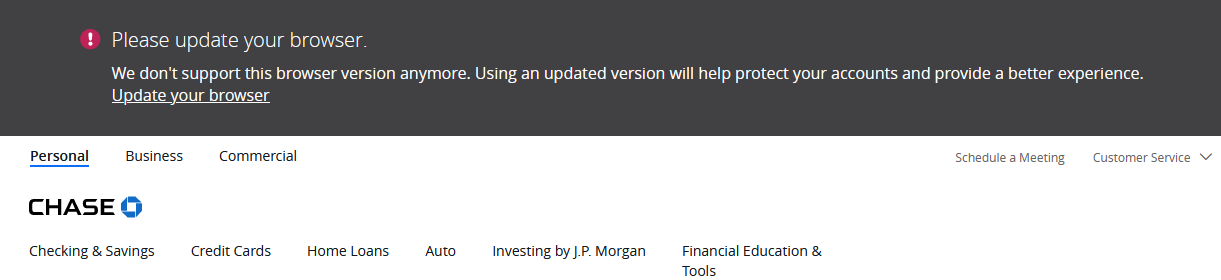
Chase Bank say that my Firefox browser is out of date

Hello,
Whenever I try to log into my Chase Bank account, using my Firefox browsers, I get a message that says that my browser is out of date, and needs to be updated. But I am using browser version 103, and I believe that is the current version. I contacted Chase about this, but they did not offer any solutions to the problem.
Is anyone else having this problem?
Thank you
Seçilen çözüm
Do you see any general.useragent prefs on the about:config page that are bold (userset) ?
You can open the about:config page via the location/address bar. If you get the warning page, you can click the "Accept the Risk and Continue" button.
You can paste general.useragent in the search bar at the top of the about:config page to filter for those prefs.
Bu yanıtı konu içinde okuyun 👍 1Tüm Yanıtlar (10)
This may be due to stuff added to the end of your Firefox User Agent
in your More system details on right of your post the UA appears to be Mozilla/5.0 (Windows NT 10.0; Win64; x64; rv:103.0) Gecko/20100101 Firefox/103.0 Viewer/99.9.6168.69
The Viewer/99.9.6168.69 should not be there.
Perhaps this article may help fix it. https://support.mozilla.org/en-US/kb/how-reset-default-user-agent-firefox
Thank you for the information James !
Were you able to determine what caused that extra stuff to get appended as this might help others who stumble upon this thread ?
I looked at the information, and it is great, but I am not quite technical enough to fix this. I do have three extensions: Malwarebytes, Capital One Eno, and Sapling spell checking.
Thank you
Recently Avast and AVG anti-tracking were the culprit in adding modifications to Firefox's "user agent string" after it left the browser. That is because they intercept all your browser requests to filter them. And apparently to create incompatibilities. ;-)
I don't know whether Malwarebytes has a similar feature.
I removed all three of my Add-Ons: Malwarebytes, Capital One Eno, and Sapling spell checker, but when I tried to log into Chase Bank, I still got the same error message. So it doesn't appear to be the Add-Ons.
In a previous post James mentioned that Viewer/99.9.6168.69 should not be showing on the User Agent.
What is a Viewer?
Also, what is Gecko?
Thank you!
Gecko is an internal name for the rendering engine, a component of Firefox.
Do you run any external programs that may be modifying your browsing?
On a site that collects user agent strings, this Viewer/9nnnnn is showing up on a lot of Chrome user agents as well. For example: "Viewer/" site:user-agents.net on Google.
I have Ccleaner and it's companion app Kamo on my laptop. I turned the apps off, restarted my computer, and tried to log into Chase again, but got the same error message.
I then refreshed Firefox, restarted my computer, but still got the same Chase error message.
Seçilen çözüm
Do you see any general.useragent prefs on the about:config page that are bold (userset) ?
You can open the about:config page via the location/address bar. If you get the warning page, you can click the "Accept the Risk and Continue" button.
You can paste general.useragent in the search bar at the top of the about:config page to filter for those prefs.
cor-el tarafından tarihinde düzenlendi
Hello,
I deleted my Firefox app, and reinstalled it. Viewer/99.9.6168.69 is gone from my User Agent string, and I am no longer getting those error messages from Chase bank.
But I learned a lot on this post. I had never heard of a User Agent before. I thought it was part of the Metaverse.
I am still studying the great information that you guys gave, so thank you very much !