

Bu başlık arşivlendi.
Yardıma ihtiyacınız varsa lütfen yeni bir soru sorun.

Arşivlendi
How to set zoom on a element using Javascript on Firefox?
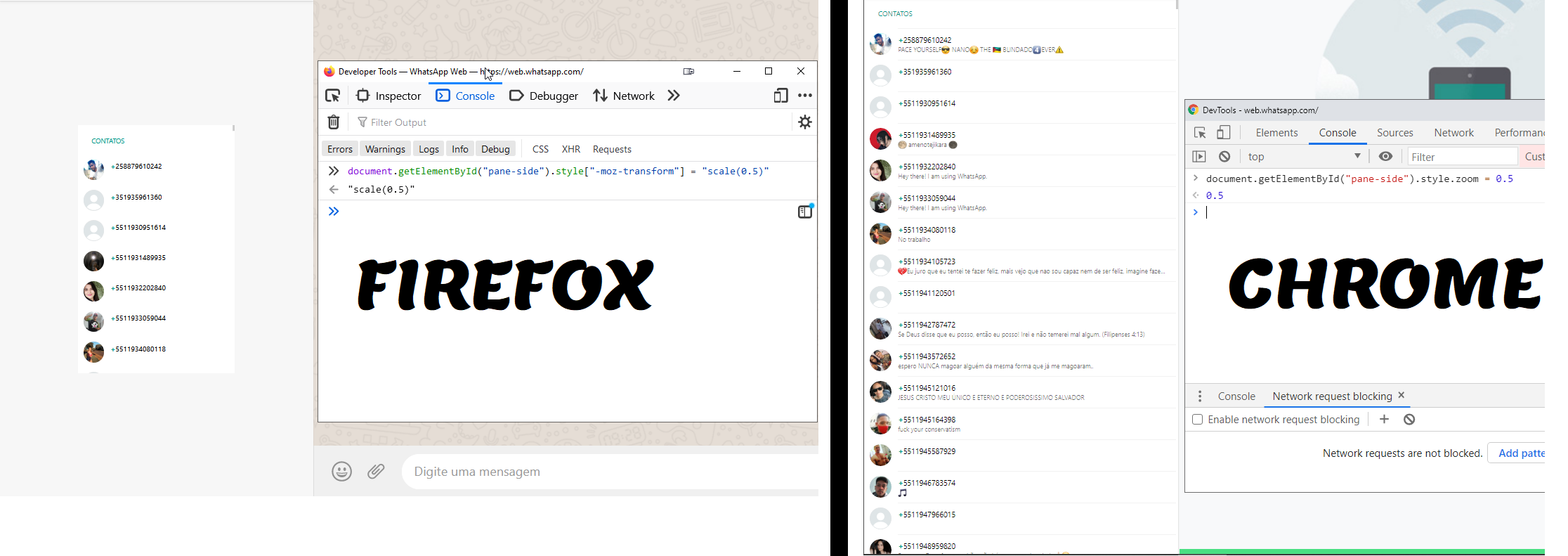
I can change a page element on Chrome using zoom
document.getElementById("pane-side").style.zoom = 0.5
Looks like Firefox did not support zoom, when i run the same code nothing happens.
Im searching for how to use zoom on Firefox, and i got this code:
document.getElementById("pane-side").style["-moz-transform"] = "scale(0.5)" But the result was not what I expected:
https://user-media-prod-cdn.itsre-sumo.mozilla.net/uploads/images/2021-01-04-17-23-44-fa1a16.png

Im trying to zoom out the element like on Chrome, any advice?
I can change a page element on Chrome using zoom
'''document.getElementById("pane-side").style.zoom = 0.5'''
Looks like Firefox did not support zoom, when i run the same code nothing happens.
Im searching for how to use zoom on Firefox, and i got this code:
'''document.getElementById("pane-side").style["-moz-transform"] = "scale(0.5)"'''
But the result was not what I expected:
https://user-media-prod-cdn.itsre-sumo.mozilla.net/uploads/images/2021-01-04-17-23-44-fa1a16.png
Im trying to zoom out the element like on Chrome, any advice?
Tüm Yanıtlar (3)
Hello, any help?
Try this instead:
- document.getElementById("pane-side").style.transform = "scale(0.5)";
Same result as of document.getElementById("pane-side").style["-moz-transform"] = "scale(0.5)"