


Maps in websites are not shown anymore in 80.0.1
Hi,
I've been visiting several sites with maps enclosed. An example: link text
The same in my wordpress site. Whats going on, an more important, how to tackle this problem? So Firefox doesn't make friends. In particular if Firefox doesn't give a solution.
Seçilen çözüm
As told in the other question, I'll reinstall windows.
Bu yanıtı konu içinde okuyun 👍 0Tüm Yanıtlar (6)

The link you posted is not to a map.
Make sure you are not blocking content.
Start Firefox in Safe Mode {web link}
A small dialog should appear. Click Start In Safe Mode (not Refresh). Is the problem still there?
https://support.mozilla.org/en-US/kb/enhanced-tracking-protection-firefox-desktop
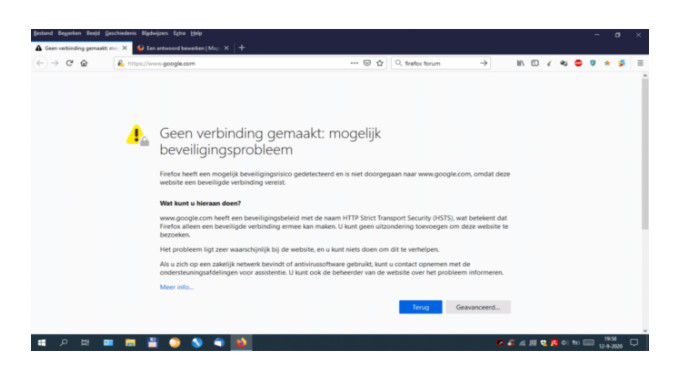
Unfortunately, safe mode, no difference. BUT if using my vpn, even to my own country, it works fine. This is not the wanted solution. Even https://www.google.com/ doesn't work:
AKostenzer tarafından tarihinde düzenlendi
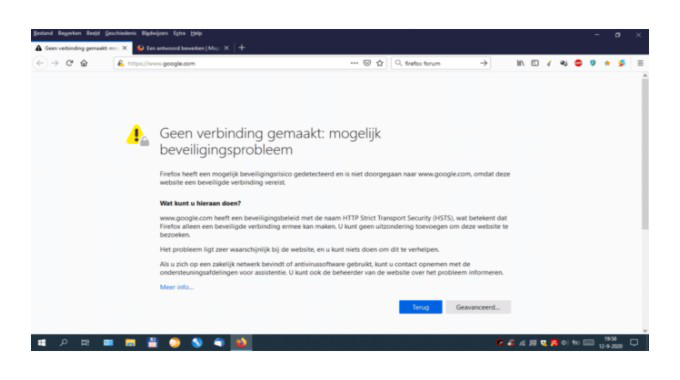
I wanted to add an screen copy of the error message. If I would post it in dutch it wouldn't be so understandable for everyone. So I changed he Firefox interface language. Didn't work. Then I used a VPN to the UK. Didn't work either. Then I changed the Search language into English and.....no error appeared anymore????!!!! Switching back to dutch doesn't give problems anymore.
But Switching vpn off and all the problems back again. Even https://www.google.com/ doesn't work any more. Attaching a jpg doesn't work either.
VPN is now switched on and I upload the error screen dump again. Will it work now? No. Without screen dump?
I called for more help.
Hi Fred,
How long takes it posting a response here before it becomes visible?
I have done a lot of things. Safe mode Checked Hosts. Google could be blocked. Run a total virus scan, Checked with malwarebytes.
Nothing helps and nothing is found. So I will reinstall windows from scratch. The more because a friends laptop doesn't have this problems on our network.
Thanks for your help
Rob
Seçilen çözüm
As told in the other question, I'll reinstall windows.