


Firefox not compatible with many websites

Hello,
many sites are not compatible with Firefox only. they recommend to use IE/Edge and Chrome
can Firefox be more compatible?
I really like Firefox interface and want to use for all sites
Seçilen çözüm
Sometimes a site uses a proprietary Microsoft technology or a nonstandard Google feature that Mozilla chose not to implement. Sometimes Firefox has a bug.
But sometimes there is a difference that was overlooked in testing because the developers are busy with other things and do not place a priority on the user's preference.
If they can't really explain the technical reasons for the problem, they might be saying "We're too lazy to look at this just so you can use your preferred browser. Please do what's easiest for us."
Two other thoughts:
(1) If the site uses Flash, make sure you grant permission. See: Why do I have to click to activate plugins?
(2) There is a website to report website-browser compatibility problems: https://webcompat.com/ You might give it a try and see if they can help.
Bu yanıtı konu içinde okuyun 👍 1Tüm Yanıtlar (10)

What is the exact message?
In order to better assist you with your issue please provide us with a screenshot. If you need help to create a screenshot, please see How do I create a screenshot of my problem?
Once you've done this, attach the saved screenshot file to your forum post by clicking the Browse... button below the Post your reply box. This will help us to visualize the problem.
Thank you!
Hello, this is is not single problem -it is general. if you give me some support contact email I can give it to website developers, making sites working fine with IE and Chrome, but not with Firefox. Because both IE and Chrome are fine (with many sites) I suspect compatibility problems with Firefox
We can start from here to see if it's an issue with the browser or your setup.
Please explain the problem in detail. What happens? Error messages?
Please provide public link(s) (no password) that we can check out. No Personal Information Please !
See:
- https://support.mozilla.org/en-US/kb/websites-say-firefox-outdated-or-incompatible
- https://support.mozilla.org/en-US/kb/Finding+your+Firefox+version
You can check this pref on the about:config page and make sure that it is false.
- privacy.resistFingerprinting = false
You can open the about:config page via the location/address bar. You can accept the warning and click "I accept the risk!" to continue.
Hello, you can see the answer from vendor support to my request I reported that cannot use their tool with Firefox
same I have from other websupports
if you wish I can connect you with vendor support to discuss why Firefox is not supported
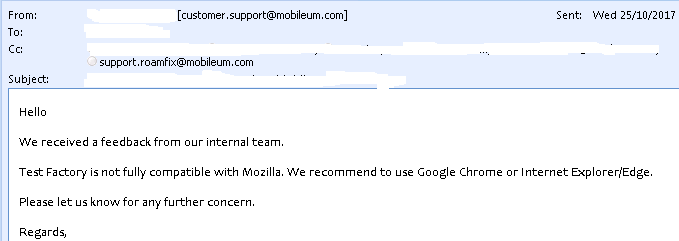
Hello, is there any chance to make Firefox more compatible?
Seçilen çözüm
Sometimes a site uses a proprietary Microsoft technology or a nonstandard Google feature that Mozilla chose not to implement. Sometimes Firefox has a bug.
But sometimes there is a difference that was overlooked in testing because the developers are busy with other things and do not place a priority on the user's preference.
If they can't really explain the technical reasons for the problem, they might be saying "We're too lazy to look at this just so you can use your preferred browser. Please do what's easiest for us."
Two other thoughts:
(1) If the site uses Flash, make sure you grant permission. See: Why do I have to click to activate plugins?
(2) There is a website to report website-browser compatibility problems: https://webcompat.com/ You might give it a try and see if they can help.
You can also check the Web Console or specific messages. Usually best is to hide the CSS errors via the selection bar if there are a lot of them.
- "3-bar" menu button or Tools -> Web Developer
- https://developer.mozilla.org/en/Tools/Web_Console
Thank you! very good explanation:) I will try to report there
I ask for vendor support, but they say just "Firefox not compatible/not supported" no detailed reason