


In Firefox for Mac, the "opening..." dialog is so small you can't see it entirely

When I click on a file whilst surfing, trying to download the file, the popup dialog window is really small, and you can't see what it says. I have tried to make it bigger but I can't. It works fine in Safari, in Chrome, etc.
I tried resetting Firefox, but that didn't help.
Any suggestions?
Tüm Yanıtlar (6)
Hello you made the new update normally it should work

https://support.mozilla.org/en-US/kb/changes-toolbars-and-window-sizes-are-not-saved You may have corrupt xulstore.json or Localstore.rdf file.
Close Firefox. Open your file browser to this hidden location:
- Mac: *~/Library/Application Support/Firefox/
- Linux: *~/.mozilla/firefox/
- Windows: %AppData%\Mozilla\Firefox\
- *C:\Users\<user>\AppData\Roaming\Mozilla\Firefox\
Locate the above files. Then rename or delete them. Restart Firefox.
I have reset Firefox, including deleting the entire Firefox app, as well as the Firefox folder in Application Support, and the popup is still (perhaps) a quarter of normal size.
Can you attach a screenshot?
- https://en.wikipedia.org/wiki/Screenshot
- https://support.mozilla.org/kb/how-do-i-create-screenshot-my-problem
- use a compressed image type like PNG or JPG to save the screenshot
- make sure you do not exceed the maximum size of 1 MB
Did you try to place the mouse at the bottom right corner to see if that allow to resize this window?
Does Mac has a system menu for windows like Alt+Space on Windows and Linux that allows to modify the window size?
I have attached a screenshot of the dialog box.
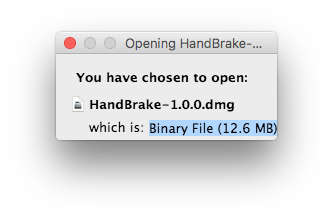
And yes, I have tried everything I know of to try. I cannot resize the window, with neither the mouse, key-commands, or menu choices.