


Windows 10 will reach EOS (end of support) on October 14, 2025. For more information, see this article.

Sök i support

Akta dig för supportbedrägerier: Vi kommer aldrig att be dig att ringa eller skicka ett sms till ett telefonnummer eller dela personlig information. Rapportera misstänkt aktivitet med alternativet "Rapportera missbruk".

Läs mer

How can I stop a piece of history from being shown in "Firefox Suggestions", which was made on an unapproachable device?

more options

I just want to stop a piece of my own history from being shown on "Firefox Suggestion", which was made with a firefox browser on my previous device and is relatively private.(I know I can do this by modifying "Search Suggestions->Show search suggestions ahead of browsing history in address bar results", but I would like to preserve the function itself). That device is permanently unapproachable, and so is that browser. I tried "Clear recent history -> Everything", but it didn't work as expected and that is still shown. I think clear all my history(not only those made on this currently used device) may help, how can I do it?
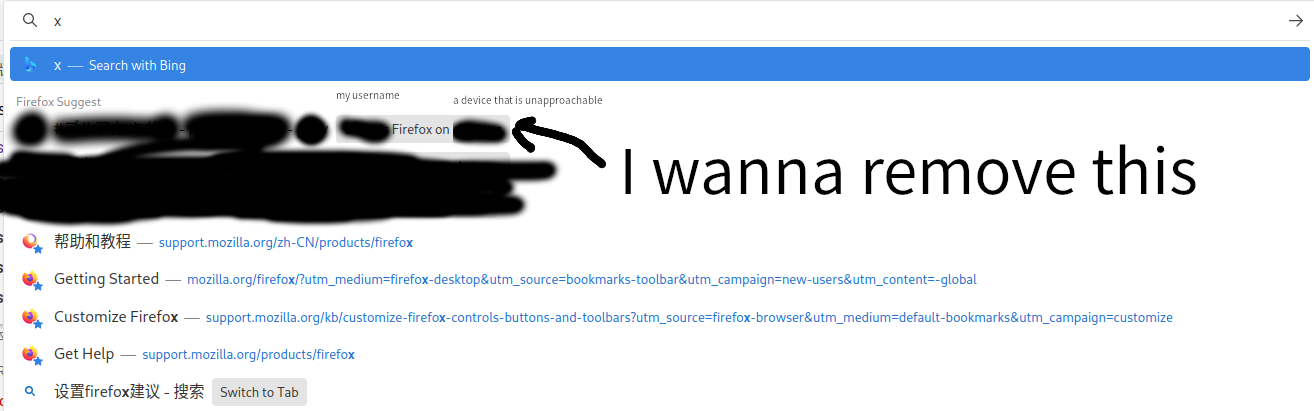
I just want to stop a piece of my own history from being shown on "Firefox Suggestion", which was made with a firefox browser on my previous device and is relatively private.(I know I can do this by modifying "Search Suggestions->Show search suggestions ahead of browsing history in address bar results", but I would like to preserve the function itself). That device is permanently unapproachable, and so is that browser. I tried "Clear recent history -> Everything", but it didn't work as expected and that is still shown. I think clear all my history(not only those made on this currently used device) may help, how can I do it?
Bifogade skärmdumpar

Vald lösning

Just found the problem can be easily solved by disconnect the deprecated device.

Läs svaret i sitt sammanhang 👍 0

Alla svar (1)

more options

Vald lösning

Just found the problem can be easily solved by disconnect the deprecated device.