


Unable to sign in to some websites, especially Facebook

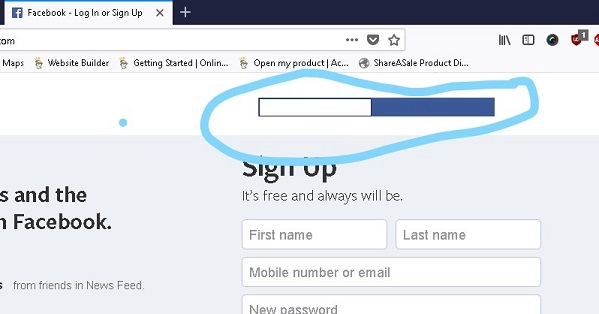
When I attempt to sign in to Facebook (and a few other sites I can't recall just now) I get blank boxes and cannot see what I am typing in order to sign in - or even if I am typing in the correct space. I don't know how else to describe this problem so am attaching a picture.
Сви одговори (2)

Make sure you are not blocking content.
Start Firefox in Safe Mode {web link} by holding down the <Shift> (Mac=Options) key, and then starting Firefox.
A small dialog should appear. Click Start In Safe Mode (not Refresh). Is the problem still there?
There is an issue reported that affects users who have turned off ClearType font rendering within the Windows settings. A workaround until this is fixed is either to turn ClearType back on or disabling hardware acceleration in Firefox.
Bug 1435472 - Invalid page rendering with hardware acceleration enabled