


Why can't I see the drop down menu when i click it and have to use arrow keys to see options?

I used to be able to go to a website, click on the drop down arrow and see all the options, but now when I click on it nothing drops down and I have to use my arrow keys to see what is there. I tried this on other browsers and the drop down menu works, just not on firefox. I am running Firefox 50.0.2. How do I fix this?
Thanks!
Izbrana rešitev
Hello ciann176, try Firefox Safe Mode to see if the problem goes away. Firefox Safe Mode is a troubleshooting mode that temporarily turns off hardware acceleration, resets some settings, and disables add-ons (extensions and themes).
If Firefox is open, you can restart in Firefox Safe Mode from the Help menu:
- Click the menu button
 , click Help
  and select Restart with Add-ons Disabled.
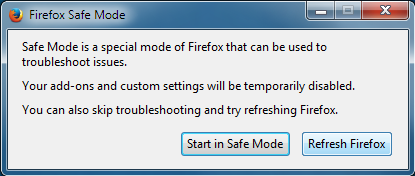
When the Firefox Safe Mode window appears, select "Start in Safe Mode".
If the issue is not present in Firefox Safe Mode, your problem is probably caused by an extension, theme, or hardware acceleration. Please follow the steps in the Troubleshoot extensions, themes and hardware acceleration issues to solve common Firefox problems article to find the cause.
To exit Firefox Safe Mode, just close Firefox and wait a few seconds before opening Firefox for normal use again.
When you figure out what's causing your issues, please let us know. It might help others with the same problem.
thank you
Preberite ta odgovor v kontekstu 👍 2Vsi odgovori (2)
Izbrana rešitev
Hello ciann176, try Firefox Safe Mode to see if the problem goes away. Firefox Safe Mode is a troubleshooting mode that temporarily turns off hardware acceleration, resets some settings, and disables add-ons (extensions and themes).
If Firefox is open, you can restart in Firefox Safe Mode from the Help menu:
- Click the menu button , click Help and select Restart with Add-ons Disabled.
When the Firefox Safe Mode window appears, select "Start in Safe Mode".
If the issue is not present in Firefox Safe Mode, your problem is probably caused by an extension, theme, or hardware acceleration. Please follow the steps in the Troubleshoot extensions, themes and hardware acceleration issues to solve common Firefox problems article to find the cause.
To exit Firefox Safe Mode, just close Firefox and wait a few seconds before opening Firefox for normal use again.
When you figure out what's causing your issues, please let us know. It might help others with the same problem.
thank you
Thank you for the help!
When I removed the hardware acceleration, the drop down menu started working again1 :)