


Vyhnite sa podvodom s podporou. Nikdy vás nebudeme žiadať, aby ste zavolali alebo poslali SMS na telefónne číslo alebo zdieľali osobné informácie. Nahláste prosím podozrivú aktivitu použitím voľby “Nahlásiť zneužitie”.

Ďalšie informácie
Otvorené

Firefox print dialogue changing when only using system dialogue (MacOS)

john.pantoja

Hello!

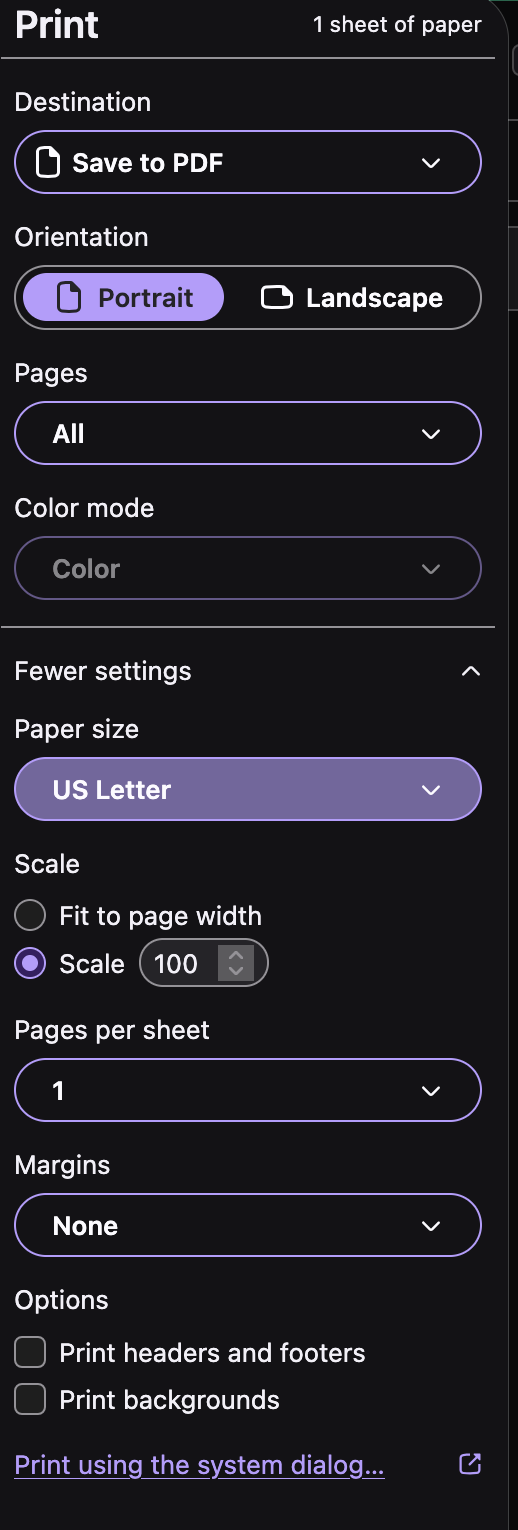
I work for a pass manufacturing company, and we rent out Macbooks for clients to print out passes on. We always set the FF print settings in the image below. Then, we go to advanced preferences and change print.prefer_system_dialog to true so that we can go straight to the system dialogue. Then, we make our presets there for the client, etc.

Often, we've had to troubleshoot issues with our clients that stem from the FF print settings changing after entering the system print dialogue and setting the preset there. When we've returned to the FF print dialogue for testing, we notice that a lot of times, the margins are set to. default, the page size is set to a completely different size than what the client is using. The scaling changes from Scale: 100% to Fit to Page Width.

We're really unsure how to proceed regarding this issue that's impacting our users, and we're having trouble finding what exactly triggers this change after the fact.

MacOS version: 15.8.2 FF Version: 160
Hello! I work for a pass manufacturing company, and we rent out Macbooks for clients to print out passes on. We always set the FF print settings in the image below. Then, we go to advanced preferences and change '''print.prefer_system_dialog''' to true so that we can go straight to the system dialogue. Then, we make our presets there for the client, etc. Often, we've had to troubleshoot issues with our clients that stem from the FF print settings changing after entering the system print dialogue and setting the preset there. When we've returned to the FF print dialogue for testing, we notice that a lot of times, the margins are set to. default, the page size is set to a completely different size than what the client is using. The scaling changes from Scale: 100% to Fit to Page Width. We're really unsure how to proceed regarding this issue that's impacting our users, and we're having trouble finding what exactly triggers this change after the fact. MacOS version: 15.8.2 FF Version: 160
Priložené obrázky

Ak chcete odpovedať na príspevky, musíte sa prihlásiť do svojho účtu. Ak ešte nemáte účet, položte novú otázku.