


Thunderbird > Message Filters > Filtering out special text/weird fonts

Hi,
Occasionally the scumbag spammer, whom is constantly harassing me, sends me emails with the sender name or subject written in a weird font.
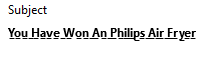
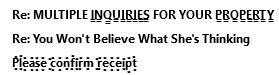
In those cases, even when I have a filter that usually filters out and deletes emails with the text in question, the filter doesn't recognise this text when these weird fonts are used and the spam email isn't deleted. I have attached some example images below.
What I want to know is whether there is any way of setting the message filters or downloading an add-on so that I can set up a filter to delete any emails containing these weird fonts?
Many Thanks,
Hi,
Occasionally the scumbag spammer, whom is constantly harassing me, sends me emails with the sender name or subject written in a weird font.
In those cases, even when I have a filter that usually filters out and deletes emails with the text in question, the filter doesn't recognise this text when these weird fonts are used and the spam email isn't deleted. I have attached some example images below.
What I want to know is whether there is any way of setting the message filters or downloading an add-on so that I can set up a filter to delete any emails containing these weird fonts?
Many Thanks,


Modified by olly_the_ox