Open
Thunderbird add-on login issue.
Mozilla Account works normally directly inside Firefox, but logging into Mozilla Accounts through Thunderbird's Add-ons manager fails during the Firefox handoff.
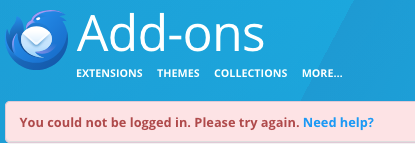
Steps to reproduce: 1. In Thunderbird Add-ons, click Log in. 2. Thunderbird redirects to Firefox, showing "Continue with Mozilla account". 3. Click Continue -> Firefox displays "You could not be logged in. Please try again."
Troubleshooting already tried:
- Created a brand-new Thunderbird profile (thunderbird -P) — same failure occurs.
- Cleared cookies/site data in Thunderbird and cleared Firefox cache.
- Disconnected existing Thunderbird/Add-ons connections from Mozilla Account dashboard.
- Extensions and add-ons themselves install and download normally.
Mozilla Account works normally directly inside Firefox, but logging into Mozilla Accounts through Thunderbird's Add-ons manager fails during the Firefox handoff.
Steps to reproduce:
1. In Thunderbird Add-ons, click Log in.
2. Thunderbird redirects to Firefox, showing "Continue with Mozilla account".
3. Click Continue -> Firefox displays "You could not be logged in. Please try again."
Troubleshooting already tried:
* Created a brand-new Thunderbird profile (thunderbird -P) — same failure occurs.
* Cleared cookies/site data in Thunderbird and cleared Firefox cache.
* Disconnected existing Thunderbird/Add-ons connections from Mozilla Account dashboard.
* Extensions and add-ons themselves install and download normally.