


고객 지원 사기를 피하세요. 저희는 여러분께 절대로 전화를 걸거나 문자를 보내거나 개인 정보를 공유하도록 요청하지 않습니다. "악용 사례 신고"옵션을 사용하여 의심스러운 활동을 신고해 주세요.

자세히 살펴보기
Open

How to delete preference to always store Passkey on device?

eldyfromcz

What happened: 1) I wanted to create a Passkey for a website and store it in Bitwarden. 2) Bitwarden pop-up opened, but while exploring the options, I accidentally clicked on the option "Use your device or hardware key: Always for this website". 3) Windows Defender dialog popped up with the options "iPhone, iPad or Android device" and "Security key" 4) I backed out of the dialog window 5) I clicked the button to create a Passkey again but going forward only the Windows Defender pop-up appears

The problem: I now cannot create a Passkey to store in Bitwarden on a specific website, because I accidentally clicked on "Use your device or hardware key: Always for this website".

What I've tried that didn't work: - looking through Bitwarden settings - deleting Firefox cookies - doing the same thing in Private Browsing - asking AI and looking through about:config, about:preferences and about:logins, as well as trying to find profile files related to webauth

Found workaround: - creating the Passkey from a different Mozilla profile

I would still very much like to be able to undo the "Always for this website". Is there a way to do that? (Attached images were captured later when recreating the situation.)
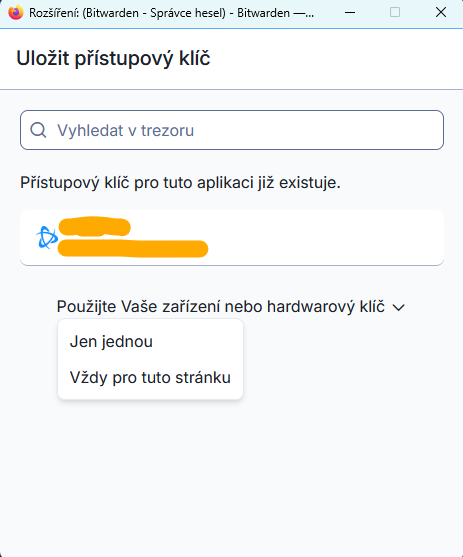
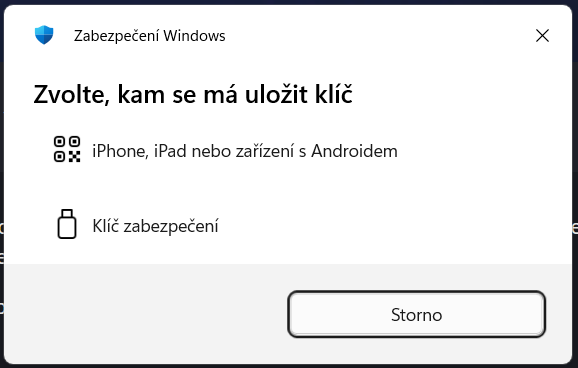
What happened: 1) I wanted to create a Passkey for a website and store it in Bitwarden. 2) Bitwarden pop-up opened, but while exploring the options, I accidentally clicked on the option "Use your device or hardware key: Always for this website". 3) Windows Defender dialog popped up with the options "iPhone, iPad or Android device" and "Security key" 4) I backed out of the dialog window 5) I clicked the button to create a Passkey again but going forward only the Windows Defender pop-up appears The problem: I now cannot create a Passkey to store in Bitwarden on a specific website, because I accidentally clicked on "Use your device or hardware key: Always for this website". What I've tried that didn't work: - looking through Bitwarden settings - deleting Firefox cookies - doing the same thing in Private Browsing - asking AI and looking through about:config, about:preferences and about:logins, as well as trying to find profile files related to webauth Found workaround: - creating the Passkey from a different Mozilla profile I would still very much like to be able to undo the "Always for this website". Is there a way to do that? (Attached images were captured later when recreating the situation.)
첨부된 스크린샷

글에 답글을 달기 위해서는 계정으로 로그인해야만 합니다. 계정이 아직 없다면 새로운 질문을 올려주세요.