


Windows 10 reached EOS (end of support) on October 14, 2025. If you are on Windows 10, see this article.

Mozilla 도움말 검색

고객 지원 사기를 피하세요. 저희는 여러분께 절대로 전화를 걸거나 문자를 보내거나 개인 정보를 공유하도록 요청하지 않습니다. "악용 사례 신고"옵션을 사용하여 의심스러운 활동을 신고해 주세요.

자세히 살펴보기

Any way to customize quick-access / dot menu or relocate Share icon to be more accessible?

  • 답글 없음
  • 0 이 문제를 만남
  • 11 보기

Many of the changes in the newest Firefox for mobile are an improvement, but one thing that really isn't is the location of the share button. I use this feature more than any other.

It used to be that I could press and hold to select the tabs I wished to share and the share button would pop right up. Now, the menu contains a bookmark icon (star) and a bin. Meanwhile the share button is hidden under the dot menu, even though there's more than enough room for it in the header bar, even with the star and bin.

If there is currently no way to customize the quick-access icons, I encourage developers to consider making the share button more prevalent or allowing users to customize quick access, in future.
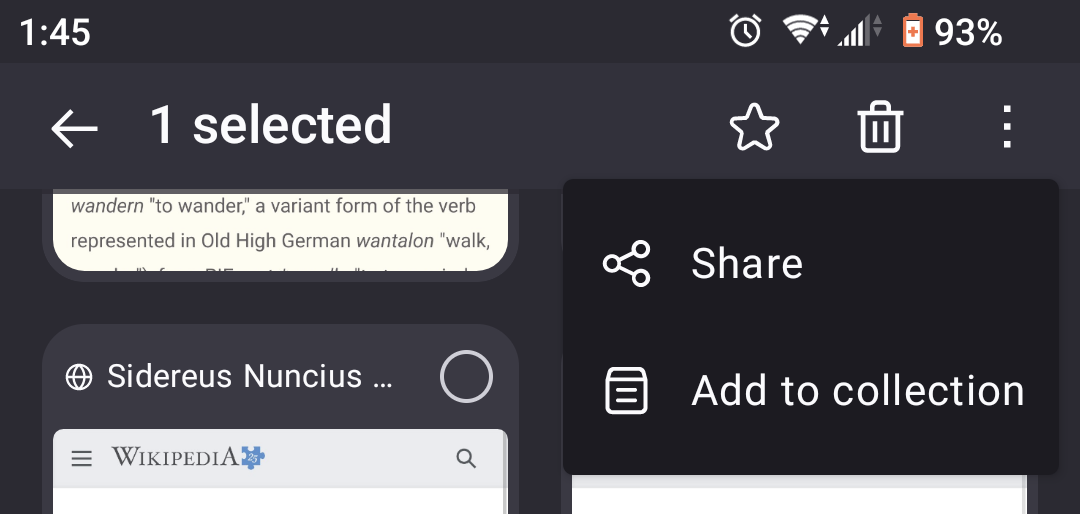
Many of the changes in the newest Firefox for mobile are an improvement, but one thing that really isn't is the location of the share button. I use this feature more than any other. It used to be that I could press and hold to select the tabs I wished to share and the share button would pop right up. Now, the menu contains a bookmark icon (star) and a bin. Meanwhile the share button is hidden under the dot menu, even though there's more than enough room for it in the header bar, even with the star and bin. If there is currently no way to customize the quick-access icons, I encourage developers to consider making the share button more prevalent or allowing users to customize quick access, in future.
첨부된 스크린샷

글쓴이 wynden 수정일시

글에 답글을 달기 위해서는 계정으로 로그인해야만 합니다. 계정이 아직 없다면 새로운 질문을 올려주세요.