


Firefox opening Gmail tab on refresh

I updated to FF24, and then performed a reset due to slow performance the other day. Since then, I have found that my GMail tab takes over when new emails arrive (i.e. the tab will automatically open whilst I am reading another tab). This is extremely irritating, and nothing I have experienced before (and I've been using Firefox since FF2!)
Is there a setting somewhere that I need to change?
შერჩეული გადაწყვეტა
We are glad to hear that your problem was solved.
Thank you using the Mozilla support forum.
ყველა პასუხი (3)
Try Firefox Safe Mode to see if the problem goes away. Safe Mode is a troubleshooting mode, which disables most add-ons.
(If you're not using it, switch to the Default theme.)
- On Windows you can open Firefox 4.0+ in Safe Mode by holding the Shift key when you open the Firefox desktop or Start menu shortcut.
- On Mac you can open Firefox 4.0+ in Safe Mode by holding the option key while starting Firefox.
- On Linux you can open Firefox 4.0+ in Safe Mode by quitting Firefox and then going to your Terminal and running: firefox -safe-mode (you may need to specify the Firefox installation path e.g. /usr/lib/firefox)
- Or open the Help menu and click on the Restart with Add-ons Disabled... menu item while Firefox is running.
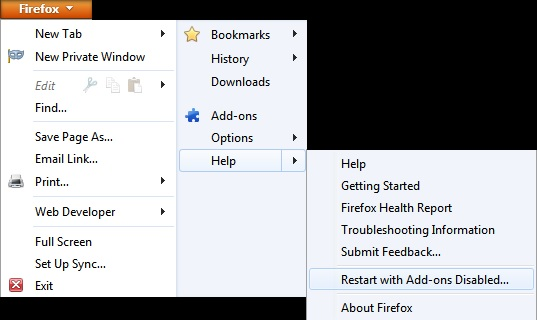
Once you get the pop-up, just select "'Start in Safe Mode"
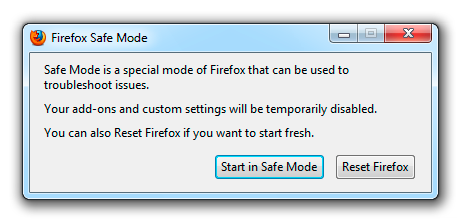
If the issue is not present in Firefox Safe Mode, your problem is probably caused by an extension, and you need to figure out which one. Please follow the Troubleshoot extensions, themes and hardware acceleration issues to solve common Firefox problems article for that.
To exit the Firefox Safe Mode, just close Firefox and wait a few seconds before opening Firefox for normal use again.
Please report back soon.
If your Gmail account is hooked up to the X-notifier, then this add-on may be the issue.
Thanks, ComputerWhiz. It seems to be X-Notifier that has developed the new behaviour. I'll go and have a look at its website.
შერჩეული გადაწყვეტა
We are glad to hear that your problem was solved.
Thank you using the Mozilla support forum.