


the drop-down menu is not rendered properly with iframe where a pdf is embedded

I want to embed a pdf in a webpage, where the drop-down menu needs to be displayed on the top of the pdf. I am using iframe to embed the pdf.
The drop-down menu is not properly rendered (border-radius and box-shadow) in Firefox at http://mysite1.webege.com/test.html.
ყველა პასუხი (5)
Yup, I see that, too.
If you try (alternately) wmode="transparent" and wmode="opaque" on the <embed>, does that make any difference?
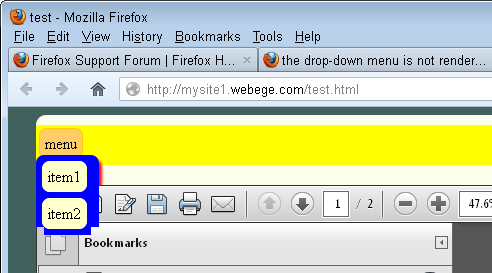
It seems no difference (http://mysite1.webege.com/testOpaque.html)
If 'border-radius' property is deleted, it could be properly rendered (http://mysite1.webege.com/test1.html) except the shadow.
You could file a bug on this here: https://bugzilla.mozilla.org/
It's possible someone else already has filed it; I didn't search for this one.
Thank you very much. I had reported the bug.
- bug 779435 - the drop-down menu is not rendered properly with iframe where a pdf is embedded
It is usually best to attach a minimal test case to the bug report.
In that case the code doesn't get lost if the page is removed from the server.