


How to change view column widths to fixed size

I use vertical view. Hate threading so that's turned off. I use a medium to large message pane. Recently been having issues with column visibility. Not sure if this is new or whether it's that I've come to a Linux client from a Windows one and there's a setting I missed when I set up the client.
Essentially dragging the column divider doesn't work properly (for me). The columns always seem to auto adjust width. Similarly if I resize the message pane the columns don't remain fixed they auto adjust.
I don't find this helpful. I prefer to set up the columns to display the amount I want/need in subject and From and I truncate the date to simply not display time.
How do I set column widths to remain where I put them? Or is this function now lost.
შერჩეული გადაწყვეტა
I had this squishy-column problem with Thunderbird "Release Channel" version 152.0.1 (64 bit) on Windows 11. I thought it was Theme related until I learned that themes are nothing but colors and background images.
I managed to "fix" the problem and reverted back to fixed columns as follows:
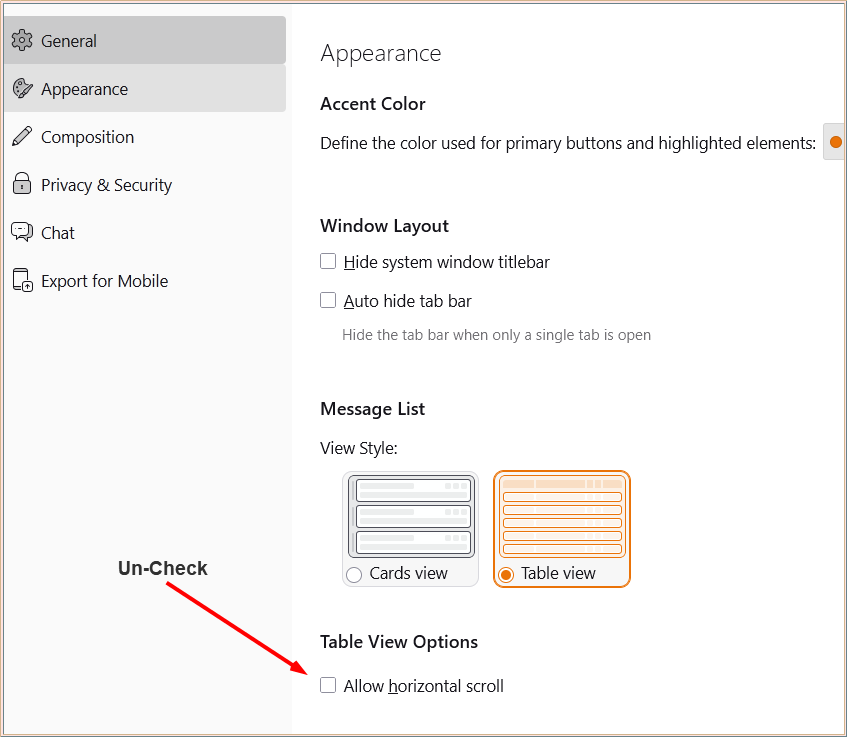
- Go to Settings --> Appearance
- Find "Table View Options" on the right, with a checkbox underneath named "Allow horizontal scroll"
- UN-CHECK THAT BOX. (If it is already unchecked, or doesn't exist, I don't know what else it could be.)
- Restart Thunderbird to make sure the setting sticks.
I tried to reproduce the problem on Rocky Linux 10, but I couldn't get the problem to occur. The columns were fixed as expected, with no squishy-ness, regardless of the Horizontal Scroll setting. Thunderbird versions I tried were 140 ESR and 153 "Meadow" from the Release channel. Perhaps the problem appeared shortly after version 140, and was fixed in 153 ??? If the above setting change doesn't work, try upgrading to version 153 from the release channel.
That's all I got! Good luck.
ყველა პასუხი (5)
Is this Thunderbird from a tarball, a snap or flatpak? They come with different restrictions just as downloading the install for windows come with different restriction to the one from the Microsoft store.
The settings do not stay set when; They go back immediately, after Thunderbird is restarted or after a reboot of the computer?
This is from the Mint repository (I think it's Mint specifically not Ubuntu, but that's only from a couple of things I read long ago) text from the help dialogue shows:
140.11.0esr (64-bit) Release notes Thunderbird for Linux Mintmint-001 - 1.0
The last bit of which would suggest a specific build.
I always assumed that specific builds were due to system hooks/interfaces and that the user interface would be consistent across OS platforms (at least as much as screen size and hardware would allow). From what you say that's not the case?
In terms of the specific issue, I assume that the list pane of the window has been constructed as a table with a fixed width that's set/adjusted to the width of the pane and the columns within are set to adjust automatically within that table. At least that's what it looks like. It's just is there a way to control the column behaviour or do I need to change?
შერჩეული გადაწყვეტა
I had this squishy-column problem with Thunderbird "Release Channel" version 152.0.1 (64 bit) on Windows 11. I thought it was Theme related until I learned that themes are nothing but colors and background images.
I managed to "fix" the problem and reverted back to fixed columns as follows:
- Go to Settings --> Appearance
- Find "Table View Options" on the right, with a checkbox underneath named "Allow horizontal scroll"
- UN-CHECK THAT BOX. (If it is already unchecked, or doesn't exist, I don't know what else it could be.)
- Restart Thunderbird to make sure the setting sticks.
I tried to reproduce the problem on Rocky Linux 10, but I couldn't get the problem to occur. The columns were fixed as expected, with no squishy-ness, regardless of the Horizontal Scroll setting. Thunderbird versions I tried were 140 ESR and 153 "Meadow" from the Release channel. Perhaps the problem appeared shortly after version 140, and was fixed in 153 ??? If the above setting change doesn't work, try upgrading to version 153 from the release channel.
That's all I got! Good luck.
As Peter Bergman said in 1974, "Everything you know is wrong."
I just upgraded my Windows version of Thunderbird to version 153, and the Squishy Column Problem returned. The Horizontal Scroll option was not changed... still UN-checked, as I had done to fix the problem before.
This time, I CHECKED the Horizontal Scroll option, and the problem was fixed again.
Apparently, just toggling that setting from whatever it was before fixes the problem, and upgrading the software breaks it again. It's like you've got a rotating light switch with a clown on the other side of the wall re-wiring it every time you flip it.
Anyway, it seems that toggling the Horizontal Scroll setting "works for now".
I hope someone from the Mozilla dev team sees this and takes a deeper look into it.
Gort,.
That's enough for me it works - and with your second note, if it changes, I'll just suspend belief, change and carry on!
Much appreciated.
I'm generally finding that Linux has a few more quirks than expected, mainly within the user program space and it's taking some time to get rid. Bit like Win 95 was when it came out. Overall though we're getting there and this is another one to tick off.
Many thanks.