


Too many emails open

When we start Thunderbird, ALL past emails open as well, as tabs. How do we prevent this?
შერჩეული გადაწყვეტა
ყველა პასუხი (5)
Open messages with a single click in the message pane instead of using the double-click to open it in a new tab. If you prefer to read messages in tabs, close all tabs before you quit Thunderbird: R-click on Mail tab > Close other tabs
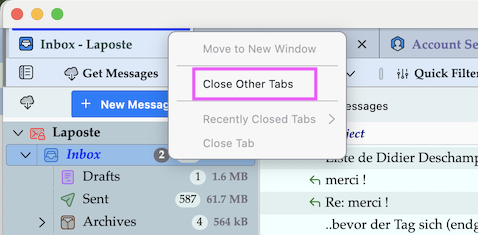
When we start the application, all messages are open as tabs. Closing the tabs does not prevent them being open next time we start Thunderbird.
Thunderbird on startup automatically displays all tabs which had been left open on closing the previous session. Go to menu Help > Troubleshooting Information > Profile Folder > Open Folder, then quit Thunderbird. In the profile folder search for the session.json file and rename it in session-old.json When you restart Thunderbird a new session.json file will be created and your open tabs from the previous session should have disappeared.
Thanks.